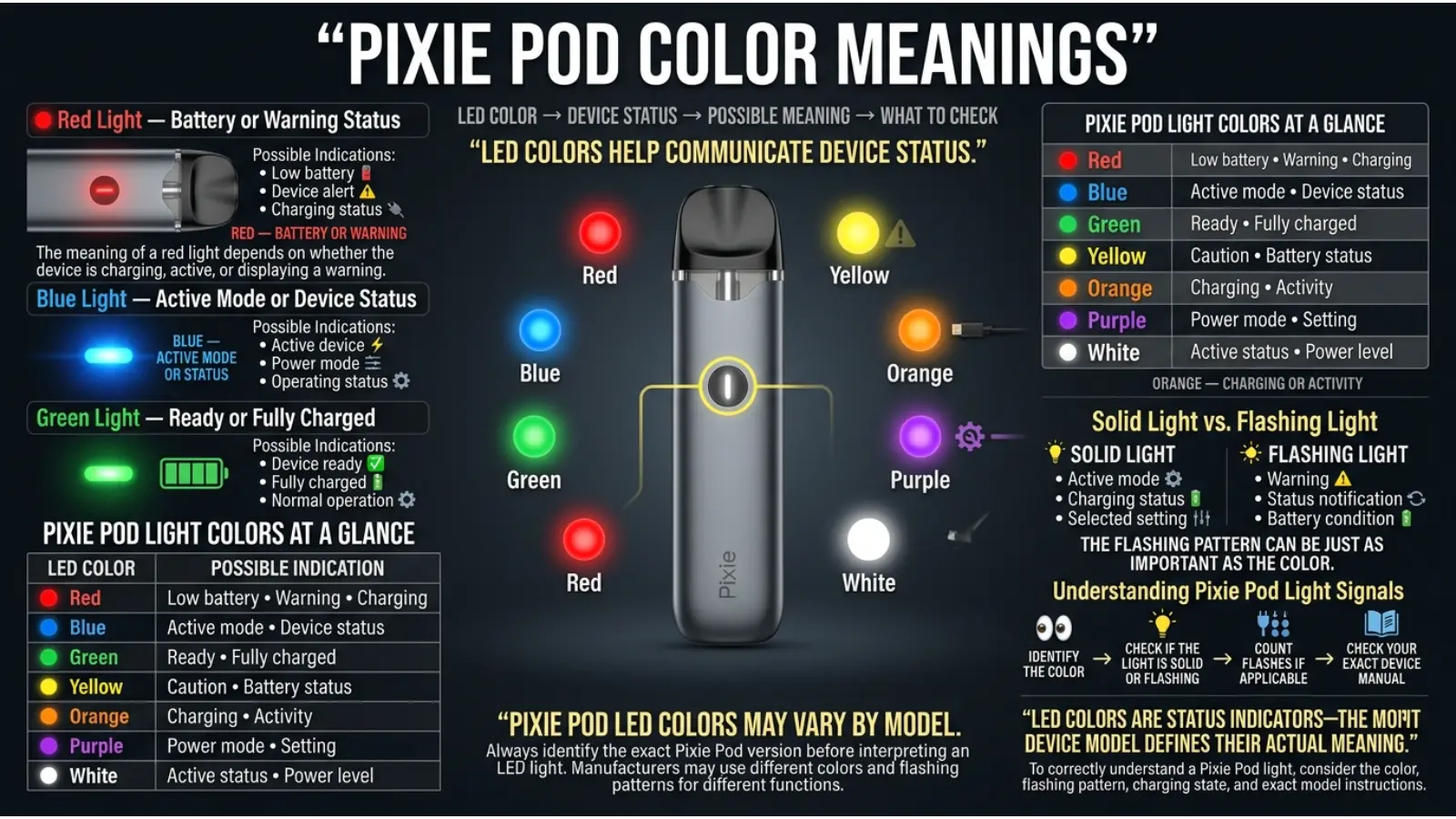
Pixie Pod color meanings usually refer to the colored LED lights that appear on the device. These lights can help communicate battery status, charging activity, activation, or a special device function. However, one important detail can cause confusion: Pixie Pod color meanings may vary depending on the exact model and product version.
People often search for Pixie Pod color meanings after seeing a red, blue, green, or flashing light and wondering what the device is trying to communicate. Although color psychology can help explain why manufacturers choose certain colors, LED colors on electronic devices are mainly functional signals.
For example, green often feels positive and ready, red naturally attracts attention as a warning, and blue can create a calm, modern, technological impression. Yet the technical meaning of these colors depends on the specific Pixie Pod model.
Quick Answer: Pixie Pod colors generally work as LED status indicators. Green commonly represents a higher battery level or ready status, blue may show a medium battery level, and red may indicate a low battery or warning. However, exact meanings can differ by model, so the device’s official instructions should always take priority.
Pixie Pod Color Meanings Chart
| Pixie Pod Light Color | Common Possible Meaning | What It May Tell You |
|---|---|---|
| 🔴 Red | Low battery or warning | The device may need charging |
| 🔵 Blue | Medium battery or normal status | The device has a moderate charge |
| 🟢 Green | Higher battery or ready status | The device may have sufficient power |
| 🌈 Rainbow | Special function or preheat mode | A device-specific feature may be active |
| ⚪ White | Activation or general status | Depends on the model |
| 🟡 Yellow | Medium battery or charging status | Check the device’s instructions |
| ✨ Flashing Light | Status change, warning, or error | The flashing pattern matters |
The chart provides general guidance. Therefore, do not assume that every Pixie Pod uses exactly the same color system.
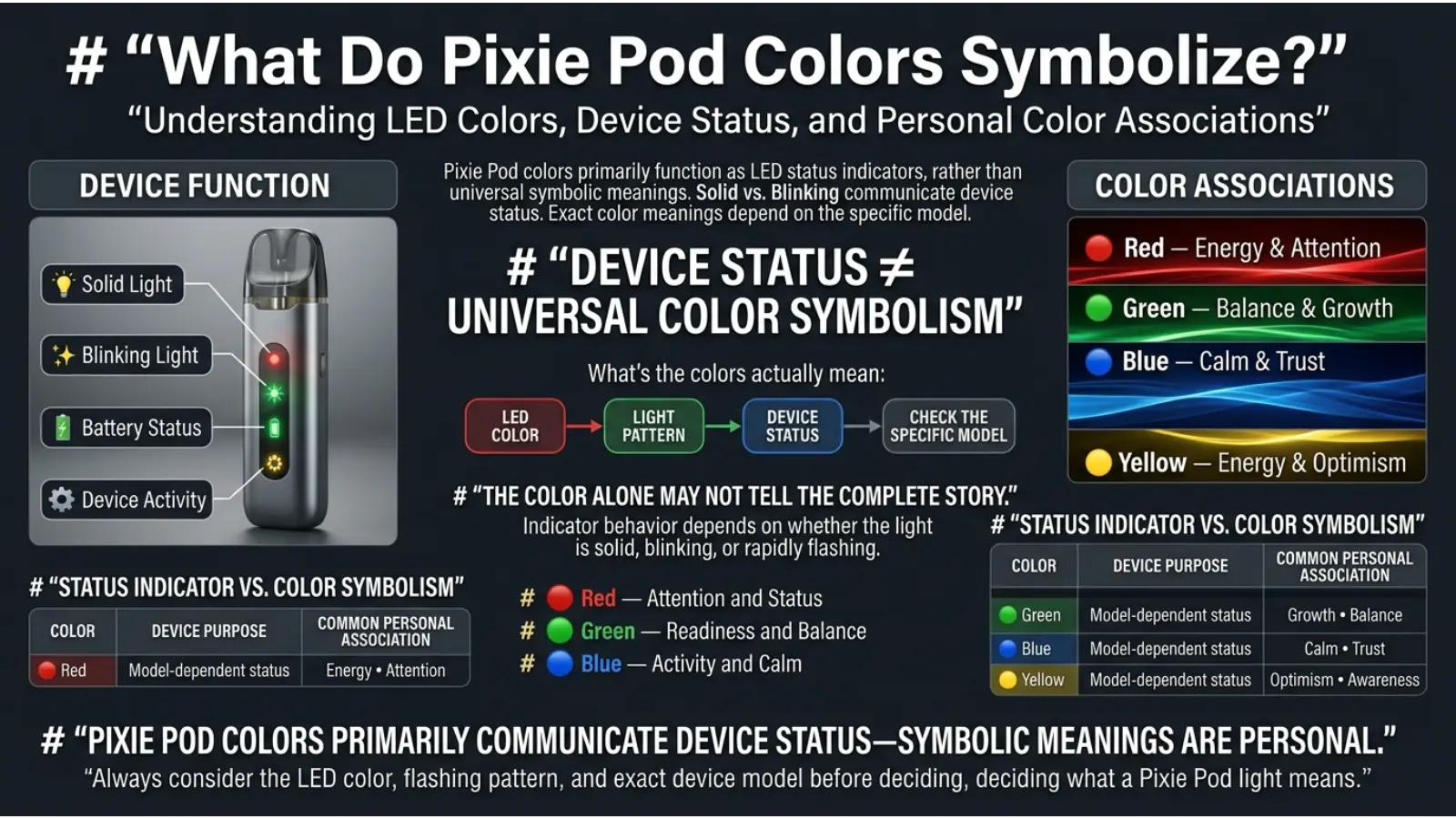
What Do Pixie Pod Colors Symbolize?
Pixie Pod LED colors are primarily designed to communicate information quickly. In this case, color is less about traditional symbolism and more about visual communication.
Manufacturers often choose colors that people already recognize from everyday life and technology.
For example:
- Red naturally attracts attention.
- Green is often connected with readiness and positive status.
- Blue feels calm, clean, and technological.
- Yellow can suggest caution or transition.
- White creates a neutral and simple appearance.
These associations make it easier for users to understand a device without needing a large screen.
Still, symbolism should not be confused with technical meaning. A green light may feel positive, but its actual meaning depends on how the Pixie Pod was programmed.
Red Pixie Pod Light Meaning
A red Pixie Pod light commonly suggests that the battery is running low or that the device needs attention.
Red is widely used in technology because the human eye quickly notices it. As a result, manufacturers often choose red for warnings, low power, errors, or other conditions that require action.
Depending on the Pixie Pod model, a red light may indicate:
- Low battery
- Charging required
- A warning signal
- A device protection feature
- A possible connection issue
The light pattern is also important. A solid red light and a flashing red light may have completely different meanings.
For instance, if the device flashes red only when you try to use it, the issue may not simply be the battery. Therefore, pay attention to when the red light appears.
The Psychology Behind Red
Red is associated with:
- Urgency
- Attention
- Energy
- Warning
- Action
In electronic products, this makes red an effective warning color. It can immediately tell the user that something may need attention.
However, a red Pixie Pod light does not automatically mean that the device is damaged.
Blue Pixie Pod Light Meaning
A blue Pixie Pod light may represent a medium battery level, normal device operation, or another model-specific status.
Blue is one of the most common colors used in modern electronics. It feels clean, calm, and technologically advanced. Consequently, manufacturers often use blue when they want an indicator to appear noticeable without creating the urgency associated with red.
Depending on the model, blue may indicate:
- Medium battery level
- Normal operation
- Device activation
- A selected mode
- A charging status
Because there is no universal LED color standard for every pod device, the meaning can change between versions.
Why Blue Works Well in Technology
Blue is commonly associated with:
- Trust
- Calmness
- Technology
- Reliability
- Clean design
For this reason, blue LEDs appear on many electronic devices, from wireless accessories to charging equipment.
The psychological association does not determine the technical meaning, but it may influence why designers select blue as an interface color.
Green Pixie Pod Light Meaning
A green Pixie Pod light often represents a higher battery level, sufficient power, or a ready status.
Green is frequently used in digital interfaces because many people associate it with positive conditions. Traffic signals, battery indicators, and computer systems have strengthened this connection.
Depending on the Pixie Pod model, green may suggest:
- High battery level
- Sufficient charge
- Ready status
- Normal operation
- A completed process
Why Green Feels Positive
Green is commonly connected with:
- Growth
- Balance
- Safety
- Readiness
- Success
In technology, green can quickly communicate that a system is functioning normally.
Still, users should remember that green does not have one universal technical meaning. The same color may represent another setting on a different device.
Rainbow Pixie Pod Light Meaning
A rainbow or multi-color Pixie Pod light may indicate a special device function.
Some models may use multiple colors for features such as:
- Preheat mode
- Activation
- Special settings
- Mode changes
- Startup sequences
Unlike simple battery indicators, multi-color displays often communicate that the device is performing a specific action.
If you see a rainbow pattern, notice what happened immediately before the colors appeared. For example, did you press a button multiple times, connect the charger, or activate the device?
Context can help you understand the signal.
Why Rainbow Lights Are Used
A multi-color light is visually different from a standard battery indicator. Therefore, it immediately tells the user that something unusual or special is happening.
Rainbow lighting can also make a compact electronic device feel more modern and visually distinctive.
What Does a Flashing Pixie Pod Light Mean?
A flashing Pixie Pod light should be interpreted differently from a solid light.
The flashing pattern can provide additional information.
For example:
| Light Pattern | Possible Meaning |
|---|---|
| Solid light | Current battery or device status |
| Slow flashing | Charging or transition |
| Rapid flashing | Warning or error |
| Several flashes | Device-specific notification |
| Multi-color flashing | Special mode or function |
The number of flashes can also matter. Therefore, simply knowing that the light is red, blue, or green may not provide enough information.
The best way to understand a flashing Pixie Pod light is to consider four details:
Color + flashing pattern + timing + device model.
Together, these clues provide a much clearer explanation.
Why Pixie Pod Uses Different Colors
Small electronic devices usually do not have enough space for a large screen. As a result, manufacturers use LED lights as a simple communication system.
Colors can quickly communicate information about:
- Battery power
- Charging
- Device activation
- Special functions
- Warnings
- Errors
- Operating modes
A color system allows users to receive information without reading a complicated display.
This approach is common in modern technology because color can be understood faster than written information.
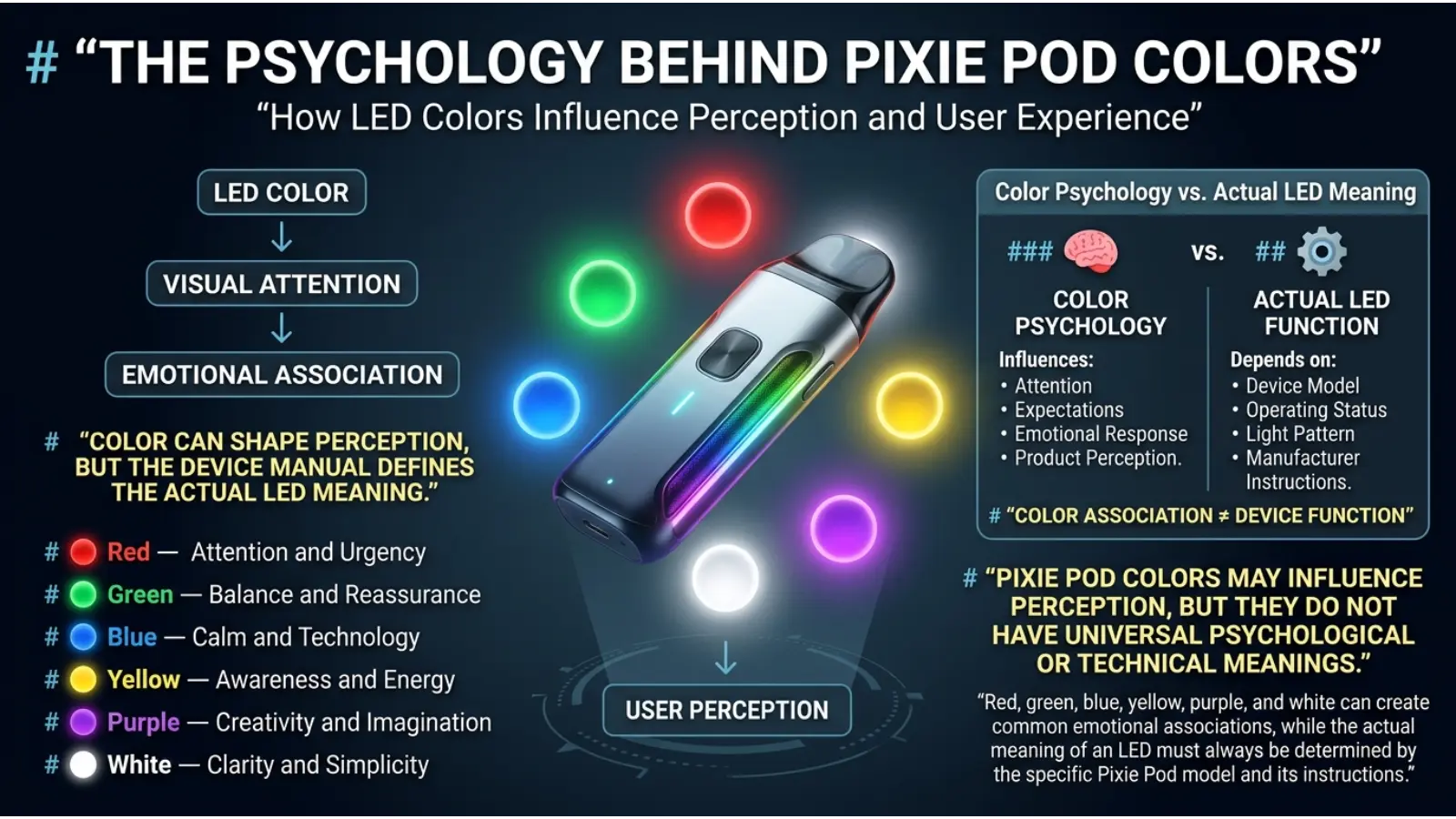
The Psychology Behind Pixie Pod Colors
Color psychology helps explain why certain colors feel suitable for particular types of messages.
However, it is important to separate psychological associations from scientific claims about device functions.
A red light does not technically become a warning because psychology says red is dangerous. Instead, designers may choose red because many people already recognize it as a color that attracts attention.
Red Creates Urgency
Red has strong visual impact.
In device design, it can communicate:
- Low power
- Warning
- Error
- Attention required
Therefore, it is a practical choice for an important status signal.
Blue Creates a Calm Technology Feel
Blue often appears modern and reliable.
It may be chosen because it suggests:
- Technology
- Stability
- Calmness
- Cleanliness
As a result, blue works well for general operating indicators.
Green Suggests Readiness
Green is often associated with positive conditions.
In user interfaces, it can suggest:
- Ready
- Complete
- Normal
- Sufficient power
This makes it useful for battery and status indicators.
Yellow Attracts Attention Without Strong Alarm
Yellow and amber sit between the emotional intensity of red and the positive feeling of green.
As a result, these colors may be useful for:
- Medium battery levels
- Caution
- Charging
- Transitional status
Again, the exact meaning depends on the device.
Pixie Pod Colors Are Not Universal
One of the biggest misconceptions about Pixie Pod color meanings is the belief that every color has one fixed definition.
That is not always true.
Different manufacturers and device versions can use different systems.
For example, one device may use:
- Green for high battery
- Blue for medium battery
- Red for low battery
Another device may use colors for:
- Temperature settings
- Voltage levels
- Activation
- Charging
- Connection status
Therefore, copying the color chart from a different vape device may lead to the wrong interpretation.
How to Correctly Read a Pixie Pod Light
When trying to understand a Pixie Pod color, follow these steps.
1. Identify the Color
First, determine whether the light is:
- Red
- Blue
- Green
- White
- Yellow
- Multi-color
However, color alone is only the first clue.
2. Check Whether the Light Is Flashing
Next, observe whether the light is:
- Solid
- Slowly blinking
- Rapidly flashing
- Pulsing
- Changing colors
The pattern may completely change the meaning.
3. Notice When the Light Appears
Timing is extremely useful.
Ask yourself:
- Does the light appear while charging?
- Does it appear during activation?
- Does it appear after pressing a button?
- Does it flash when the device is not working?
The answer can help identify the status.
4. Check the Exact Model
Different Pixie Pod versions may use different LED systems.
Therefore, identifying the exact device version is essential before relying on a general color chart.
How Lighting Can Change the Appearance of Pixie Pod Colors
The environment can sometimes make an LED light appear different.
For example, a blue LED may look lighter in a dark room. Meanwhile, a green light may appear yellowish under certain lighting conditions.
Factors that can affect color appearance include:
- Room lighting
- Sunlight
- Screen brightness
- Reflections
- Eye adaptation
- LED brightness
Therefore, if a color appears unusual, check the device in normal lighting.
A weak battery can also affect how brightly some indicators appear.
Pixie Pod Color Meanings and Context
Color does not communicate information by itself. Context changes how people understand color.
A red light on a decorative object may simply be a design choice. However, a red light on an electronic device may suggest a warning.
Similarly, green may represent nature in a painting but battery status on a device.
This is why the same color can have several meanings.
Context Is More Important Than Symbolism
When interpreting a Pixie Pod light, prioritize:
- The device model
- The timing of the light
- The flashing pattern
- The official instructions
- The color itself
Traditional color symbolism can help explain the design choice, but it should not replace technical information.
Do Pixie Pod Body Colors Have Special Meanings?
The physical color of a Pixie Pod may not have the same meaning as its LED light.
A device may be available in different colors for reasons such as:
- Branding
- Product identification
- Flavor differentiation
- Special editions
- Style preferences
- Packaging design
For example, a purple or blue exterior does not automatically mean that the device has a specific technical setting.
The physical color and the LED indicator should be treated as separate things.
Color as a Flavor and Product Identity Tool
Manufacturers sometimes use colors to help visually identify different product varieties.
Common associations may include:
| Color | Common Visual Association |
|---|---|
| Blue | Cool or berry-inspired products |
| Green | Herbal, mint, or fresh themes |
| Yellow | Citrus or bright flavors |
| Orange | Fruit or tropical themes |
| Purple | Berry-inspired or premium themes |
| Pink | Sweet or fruit-inspired themes |
| Black | Premium or bold design |
| Gold | Luxury or special edition |
These are marketing associations rather than universal rules.
A product can use any color for branding, so always read the label instead of relying only on appearance.
Pixie Pod Colors in Branding and Marketing
Color plays an important role in how electronic products look and feel.
A manufacturer may choose a particular color to create an impression before a person even uses the device.
Blue for Modern Design
Blue can make technology feel:
- Modern
- Clean
- Reliable
- Sophisticated
Therefore, blue works well in electronics and digital branding.
Green for Freshness
Green often creates associations with:
- Freshness
- Nature
- Energy
- Balance
In product packaging, green may help create a fresh or herbal visual identity.
Purple for Creativity and Mystery
Purple can feel:
- Creative
- Unusual
- Luxurious
- Imaginative
For this reason, purple can help a product stand out from more common black, white, and silver devices.
Black for a Premium Appearance
Black is often used to create:
- Simplicity
- Strength
- Elegance
- A premium appearance
However, these impressions are influenced by culture, design trends, and personal preference.
The Cultural Meaning of Pixie Pod Colors
The LED colors themselves are mainly functional, but people’s emotional reactions to colors can vary across cultures.
For example, red may represent luck and celebration in some cultural traditions while representing danger or warning in many technical systems.
Green may represent nature in one context and prosperity or renewal in another.
Therefore, color meanings should never be treated as identical everywhere.
Electronic devices often rely on widely recognized interface conventions rather than deeper cultural symbolism. Even so, cultural experience can influence how quickly someone understands a color signal.
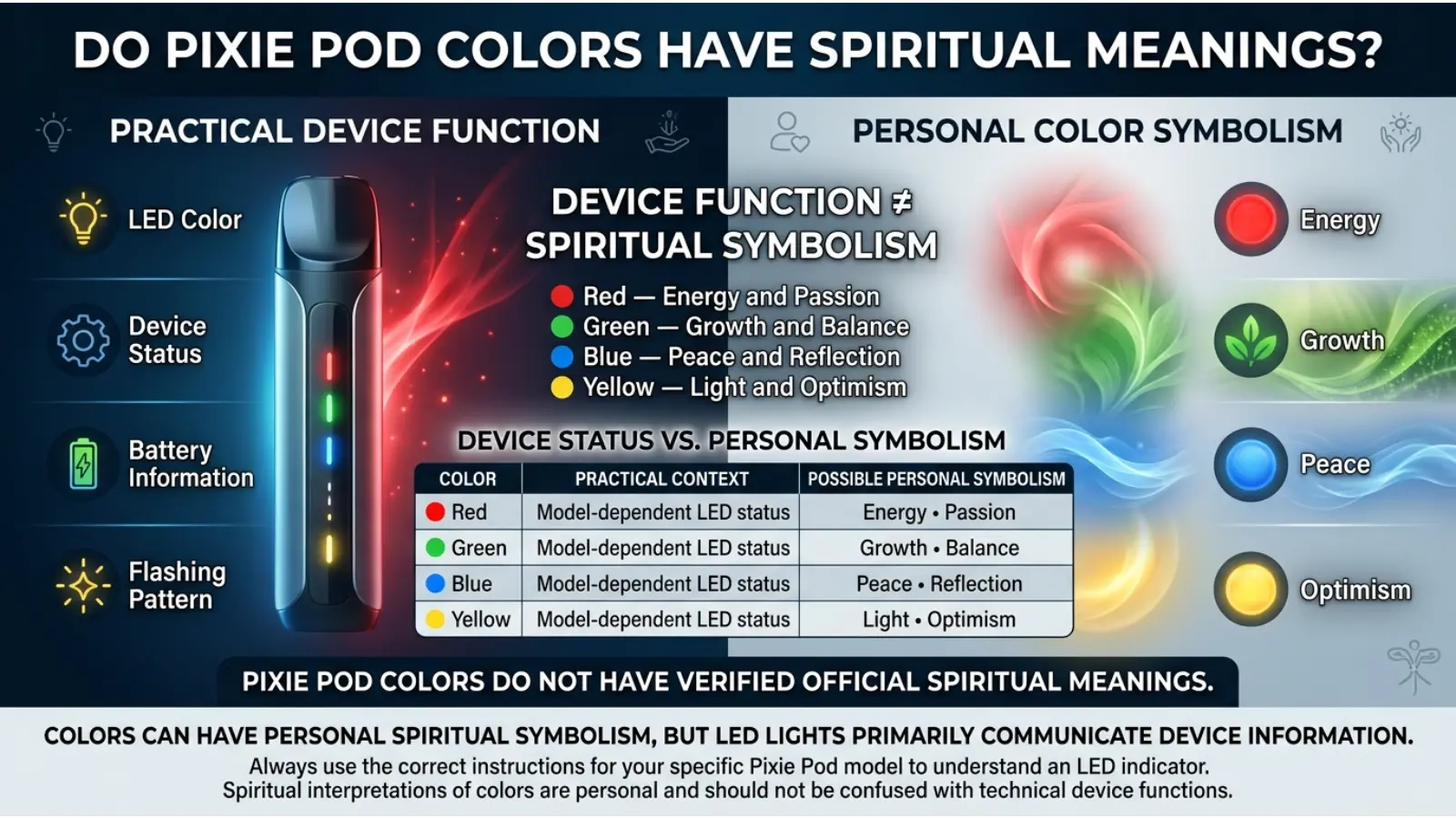
Do Pixie Pod Colors Have Spiritual Meanings?
Pixie Pod LED colors are primarily technical indicators. Therefore, it would be misleading to claim that the device’s lights have official spiritual meanings.
However, people may personally connect colors with spiritual symbolism.
For example:
- Red may symbolize energy or strength.
- Blue may symbolize peace or communication.
- Green may symbolize growth or balance.
- Purple may symbolize imagination or spiritual reflection.
- White may symbolize clarity or purity.
These interpretations come from broader symbolic traditions and personal beliefs. They do not explain the technical function of a Pixie Pod LED.
Spiritual interpretations vary significantly between traditions, cultures, and individuals.
Personality Associations and Color Preferences
Some people enjoy choosing products based on color because color can feel like a form of personal expression.
For example, someone who prefers blue products may enjoy their calm or modern appearance. A person who likes purple may enjoy creativity or uniqueness in design.
Still, color preference does not determine personality.
There is no reliable rule saying that a person who likes green has one specific personality type or that someone who chooses red behaves in a particular way.
Preferences can change because of:
- Age
- Fashion trends
- Culture
- Personal experiences
- Memories
- Product design
Therefore, color preference should be viewed as an interesting form of expression rather than a personality test.
Common Misconceptions About Pixie Pod Color Meanings
Myth: Every Red Light Means the Same Thing
This is false.
Red can mean low battery on one device and another status on a different model.
Myth: Green Always Means Fully Charged
Green may indicate a high battery level or ready status, but the exact meaning depends on the device.
Myth: You Only Need to Look at the Color
The flashing pattern and timing can be equally important.
Myth: The Device Body Color Controls the Function
The physical color of the device is usually related to appearance or product identification.
Myth: All Vape Devices Use the Same Color System
There is no universal LED color code across every device.
Why Designers Use Color Instead of Words
Color is useful because people can recognize visual signals quickly.
A small LED can communicate a status without:
- A large display
- Written instructions on the device
- Complex menus
- Extra buttons
This makes color especially useful for compact technology.
Designers generally try to create signals that are:
- Easy to notice
- Easy to remember
- Different from each other
- Simple to understand
For example, using red, blue, and green creates a clear visual contrast.
How Age and Experience Can Affect Color Interpretation
People do not all interpret device colors in exactly the same way.
Experience matters.
Someone who has used many electronic devices may immediately associate red with low battery. Meanwhile, another person may need to check the instructions.
Age can also influence familiarity with digital color conventions.
In addition, vision changes can affect color perception. Some people may find it difficult to distinguish between certain shades, especially when LEDs are small or dim.
For this reason, good product design should not rely entirely on color. Flashing patterns, brightness, and timing can provide additional information.
Practical Tips for Understanding Pixie Pod Colors
Use these practical steps when you see an unfamiliar light.
Check the Battery First
If a red or unusual light appears, charging may be the first thing to check.
However, do not assume that every red signal means low battery.
Observe the Flashing Pattern
Count the flashes if possible.
A repeated pattern may communicate more information than a solid light.
Check What You Were Doing
Think about what happened immediately before the light appeared.
For example:
- Charging
- Activating the device
- Pressing a button
- Attempting to use it
This context can help identify the meaning.
Do Not Force the Device
If the device repeatedly displays an unusual warning signal, avoid repeatedly trying to activate it.
Instead, check the correct instructions for that specific model.
Keep the Device Clean
Dust or residue around electronic connection points can sometimes affect how a device operates.
Always follow the manufacturer’s cleaning and maintenance guidance.
Pixie Pod Color Meanings in Everyday Technology
The logic behind Pixie Pod colors appears in many other products.
You can see similar color communication in:
- Smartphones
- Wireless earbuds
- Power banks
- Computers
- Smart home devices
- Charging equipment
- Gaming accessories
This shows how powerful color can be as a visual language.
A small light can communicate a surprising amount of information when color and movement work together.
Why Color Changes How We Respond to Technology
Color can influence what people notice first.
A bright red flashing light usually attracts attention more quickly than a soft white glow. Likewise, a steady green light may feel calmer because people often associate it with normal operation.
This does not mean that colors control behavior in a simple way.
Instead, people learn color associations through repeated experiences.
For example, many people have seen:
- Red warning signs
- Green battery indicators
- Yellow caution symbols
- Blue technology interfaces
Over time, these repeated experiences can make color signals easier to recognize.
The Most Reliable Way to Understand Your Pixie Pod
The safest approach is simple: do not rely on general color symbolism alone.
Use this order:
Exact Pixie Pod model → device instructions → light pattern → timing → color.
This method is more accurate than searching for a general answer such as “What does a blue vape light mean?”
The same color can have different meanings depending on how the device was designed.
Pixie Pod Color Meanings FAQ
What do Pixie Pod colors mean?
Pixie Pod colors generally communicate device status, such as battery level, charging, activation, warnings, or special functions. The exact meaning depends on the specific model.
What does a red Pixie Pod light mean?
A red light may indicate low battery, charging needs, or another warning. Check whether the light is solid or flashing and identify when it appears.
What does a blue Pixie Pod light mean?
Blue may indicate a medium battery level, normal operation, or another device-specific status. The meaning is not universal.
What does a green Pixie Pod light mean?
Green commonly represents a higher battery level, ready status, or normal operation. However, the exact meaning can vary by model.
Why is my Pixie Pod light flashing?
A flashing light may indicate charging, activation, a warning, an error, or a special function. The color and number of flashes both matter.
What does a rainbow Pixie Pod light mean?
A rainbow or multi-color light may indicate a special device function, such as a mode change or preheat feature. The exact meaning depends on the device version.
Are Pixie Pod color meanings the same for every model?
No. Different versions and manufacturers can use different LED color systems.
Does the color of the Pixie Pod itself have a meaning?
Usually, the physical color is related to design, branding, flavor identification, or product style rather than a technical device setting.
Can lighting make Pixie Pod colors look different?
Yes. Sunlight, room lighting, reflections, and LED brightness can affect how a color appears to your eyes.
Should I rely only on the Pixie Pod light color?
No. Consider the color, flashing pattern, timing, and exact device model together for a more accurate interpretation.
Final Thoughts on Pixie Pod Color Meanings
Understanding Pixie Pod color meanings becomes much easier when you remember that LED colors are part of a visual communication system. Red, blue, green, and other colors may help show battery levels, device activity, warnings, or special functions.
Still, there is no reason to assume that one color always has one meaning. A blue light can mean something different depending on the model, while a flashing red light may communicate something completely different from a solid red light.
The most useful lesson is to look beyond color alone. Notice the pattern, timing, brightness, and behavior of the light. Then consider the exact Pixie Pod model.
Color can make technology easier to understand, but context gives color its real meaning.

Emma Wilson is a dedicated comparison writer and product researcher at ColorMystiic.com. She specializes in creating unbiased product comparisons, detailed reviews, and helpful buying guides. Her goal is to help readers make smarter purchasing decisions with confidence.