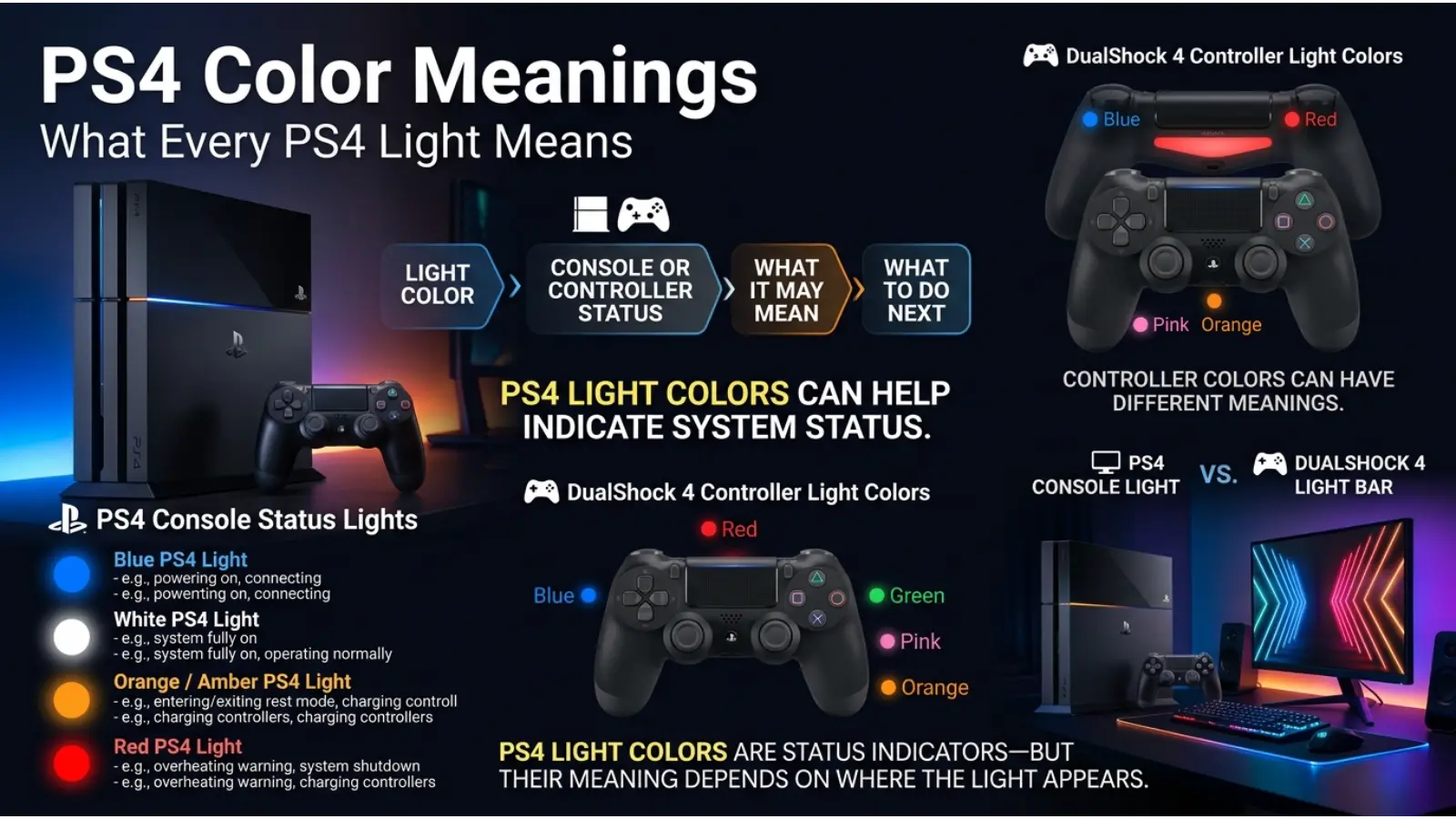
The lights on a PlayStation 4 are more than simple decoration. They provide visual information about the console’s power status, startup process, Rest Mode, controller connection, and possible technical problems. However, the meaning of a PS4 light can change depending on where you see it. For example, a white light on the console has a different purpose from the colored light bar on a DualShock 4 controller. This is why many players search for PS4 color meanings when their console suddenly displays blue, white, orange, or red.
Understanding these colors can help you tell the difference between normal operation and a potential problem. This guide explains the meaning behind PS4 colors, why the lights change, common misconceptions, and practical troubleshooting advice.
Quick Answer: PS4 colors mainly show system status. Blue usually appears during startup, white generally means the console is operating normally, orange indicates Rest Mode, and unusual red or continuously flashing lights may signal overheating or another hardware issue.
PS4 Color Meanings at a Glance
| PS4 Light Color | Common Meaning | What You Should Know |
|---|---|---|
| 🔵 Blue | Starting up or system activity | Usually normal for a short time |
| ⚪ White | Console is powered on | Normal operating status |
| 🟠 Orange | Rest Mode | Console is in low-power standby |
| 🔴 Red | Possible overheating or warning | Allow the console to cool |
| 🔵 Flashing Blue | Startup issue in some cases | May require troubleshooting |
| ⚪ Flashing White | Shutdown or system activity | Often temporary |
| The meaning of these lights depends on how long they remain visible and whether the console continues working normally. |
What Do PS4 Colors Symbolize?
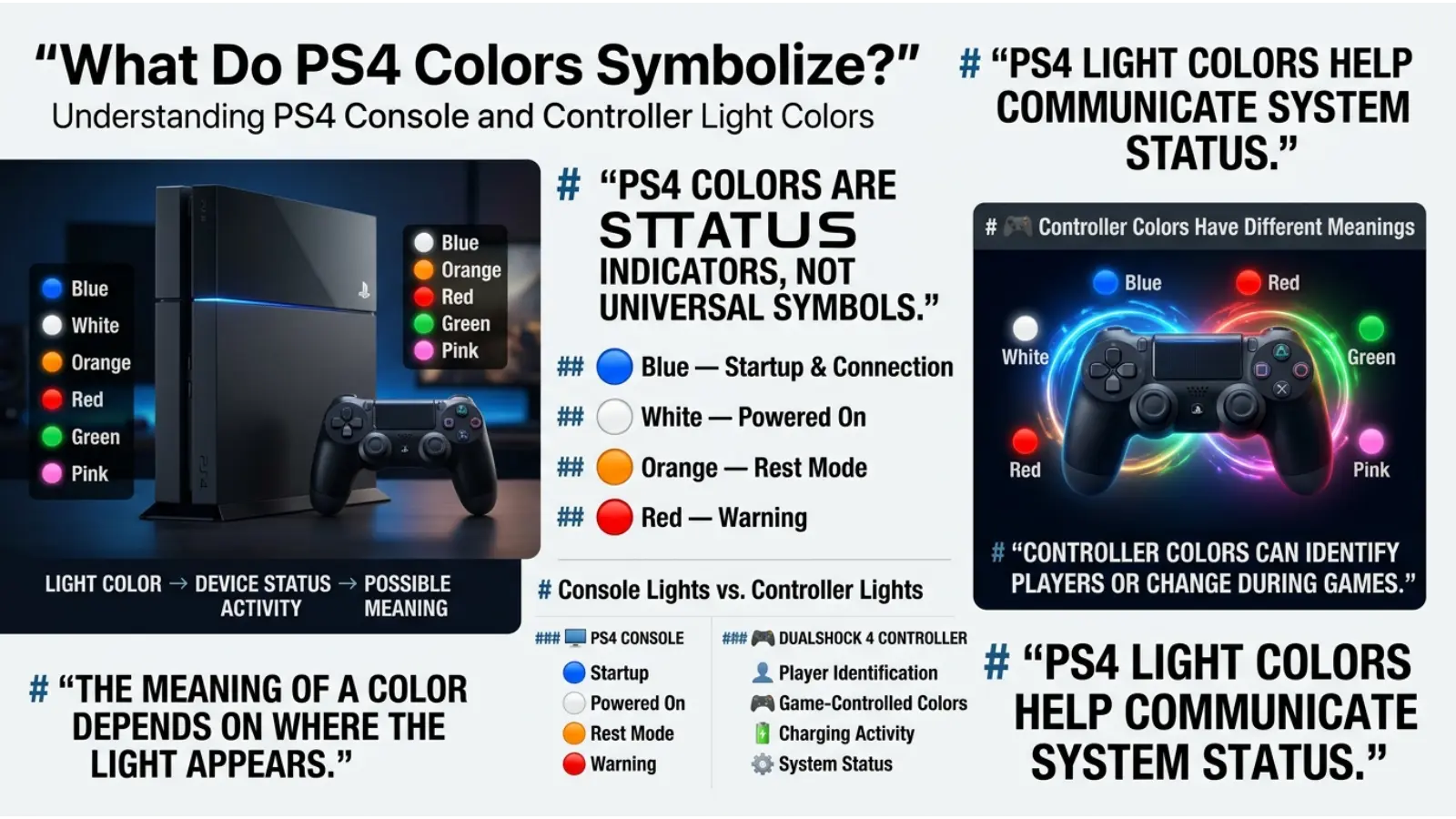
PS4 light colors are primarily functional rather than symbolic. Sony uses different colors to communicate system conditions quickly. Nevertheless, people naturally connect colors with emotional meanings because color has long been used as a visual communication tool.
Blue is commonly associated with technology, connection, trust, and digital activity. Therefore, using blue during the PS4 startup process feels intuitive because it suggests that the system is active and preparing to operate.
White often represents clarity, completion, and normal operation. On the PS4, the white light generally signals that the system has successfully powered on and is functioning.
Orange is frequently associated with caution, transition, and reduced activity. The PS4 uses an orange light for Rest Mode, which makes sense because the console is not completely turned off but is also not fully active.
Red has strong visual associations with warning and urgency. Consequently, a red PS4 light immediately attracts attention and may indicate that the console needs to cool down.
These meanings are based mainly on visual communication principles rather than spiritual symbolism.
Blue PS4 Light Meaning
A blue light is one of the first colors many players see when turning on their PlayStation 4. Normally, the console displays blue during the startup process before changing to white.
In most cases, a temporary blue light is completely normal. It simply means the system is turning on and preparing to load the operating system.
However, the situation changes if the blue light continues flashing and the PS4 does not display anything on the television. This problem is often described by players as the “Blue Light of Death.”
The name sounds dramatic, but a flashing blue light does not always mean the console is permanently damaged. Possible causes can include:
- HDMI connection problems
- Display or resolution conflicts
- System software issues
- Power interruptions
- Hard drive problems
- Internal hardware faults
Therefore, the most important factor is not simply the color blue but how long the light remains blue and whether the console successfully starts.
Why Does the PS4 Light Start Blue?
The blue startup light works as a visual signal that the console has received power and is beginning its startup sequence.
Think of it like the loading stage of a computer. The system is checking essential components and preparing the software environment needed to run games and applications.
A brief blue light followed by a white light usually indicates a successful startup. On the other hand, a blue light that remains active for an unusually long time may suggest that the startup process has stopped or failed.
This difference shows why context matters when interpreting PS4 color meanings.
White PS4 Light Meaning
A solid white light generally means that the PS4 is powered on and operating normally.
After the startup process finishes, the console often changes from blue to white. This color transition gives users a quick visual confirmation that the system has completed its basic startup sequence.
White is especially useful as a neutral status color because it is bright, easy to recognize, and visually distinct from warning colors such as red.
However, flashing white lights can occur during certain activities, including startup or shutdown. The timing and behavior of the console matter more than the color alone.
For example, a temporary flashing white light while the console shuts down is different from repeated flashing combined with the system refusing to respond.
Orange PS4 Light Meaning
An orange or amber light usually means that the PS4 is in Rest Mode.
Rest Mode allows the console to use less power while keeping certain features available. Depending on your settings, the PS4 may continue performing selected tasks while resting.
These tasks may include:
- Charging connected controllers
- Downloading updates
- Downloading games
- Maintaining certain system functions
The orange light is useful because it clearly separates Rest Mode from both full operation and complete shutdown.
This color also matches broader design conventions. Orange often represents an intermediate state, meaning something is active but not operating at full capacity.
Why Is My PS4 Light Orange?
If your PS4 light is orange, the console has most likely entered Rest Mode.
This can happen when you select Rest Mode manually or when the console automatically enters a power-saving state based on your settings.
A steady orange light is normally not a problem. However, if the console becomes unresponsive while showing orange, you may need to restart the system.
First, wait briefly to see whether the console responds to the controller or power button. Avoid disconnecting the power immediately unless the system cannot be shut down normally.
Sudden power interruptions can sometimes cause software or storage problems.
Red PS4 Light Meaning
A red light on the PS4 deserves more attention than the standard blue, white, or orange lights.
In many situations, a red warning light can indicate that the console is becoming too hot.
The PlayStation 4 produces heat while running games, especially demanding titles. Normally, the internal cooling system moves this heat away from important components. However, dust buildup, poor airflow, high room temperatures, or blocked vents can make cooling less effective.
If the PS4 displays a red warning light, stop using the console and allow it to cool.
Place the console in an open area with enough space around the ventilation openings. Avoid placing it inside a tightly enclosed cabinet or directly against surfaces that block airflow.
Do not continue playing for long periods when the system is showing signs of overheating.
Why Does My PS4 Overheat?
Overheating can happen for several practical reasons.
Dust Buildup
Dust can collect around ventilation areas and cooling components. Over time, this may reduce airflow and make it harder for heat to escape.
Poor Ventilation
A console needs open space around its vents. Placing a PS4 inside a small enclosed area can trap warm air.
High Room Temperature
The environment also affects cooling. A console operating in a very hot room must work harder to maintain a safe temperature.
Long Gaming Sessions
Extended use can increase internal heat, especially when playing graphically demanding games.
Aging Hardware
Older consoles may experience reduced cooling efficiency over time because fans and internal components experience years of use.
Regular cleaning and proper placement can help reduce overheating risks.
Flashing Blue PS4 Light Meaning
A flashing blue light is one of the most searched PS4 light problems because it can prevent the console from starting normally.
The important question is whether the blue light eventually changes to white.
If it does, the startup process was probably successful.
If the light continues flashing while the screen remains black, troubleshooting may be necessary.
Start with simple checks:
- Turn off the PS4 completely.
- Check the HDMI cable connection.
- Try another HDMI port on the television.
- Restart the television.
- Disconnect unnecessary accessories.
- Try starting the PS4 again.
If the problem continues, Safe Mode may provide additional troubleshooting options.
The safest approach is to begin with basic solutions before assuming that the console has suffered permanent hardware damage.
Flashing White PS4 Light Meaning
A flashing white light can appear when the PS4 is starting, shutting down, or changing power states.
Short-term flashing is not automatically a problem.
However, if the console remains stuck with a flashing white light and does not respond, the issue may involve the power system, HDMI connection, software, or another component.
Again, context is essential. A color cannot tell the entire story by itself.
Ask these questions:
- Is the television receiving a signal?
- Can the controller connect?
- Does the console respond to the power button?
- Does the light eventually become solid?
- Did the problem start after a power outage or update?
These details can help identify whether the issue is temporary or requires deeper troubleshooting.
PS4 Controller Color Meanings
The DualShock 4 controller also uses colored lights, but these colors have a different purpose from the main PS4 console light.
The controller’s light bar can display several colors, including blue, red, green, and pink.
These colors are often used to identify players during multiplayer games.
For example, different players may receive different colors so that the system and game can distinguish between connected controllers.
Therefore, a red controller light does not automatically mean the same thing as a red warning light on the console.
This is one of the most common misunderstandings involving PS4 color meanings.
DualShock 4 Blue Light Meaning
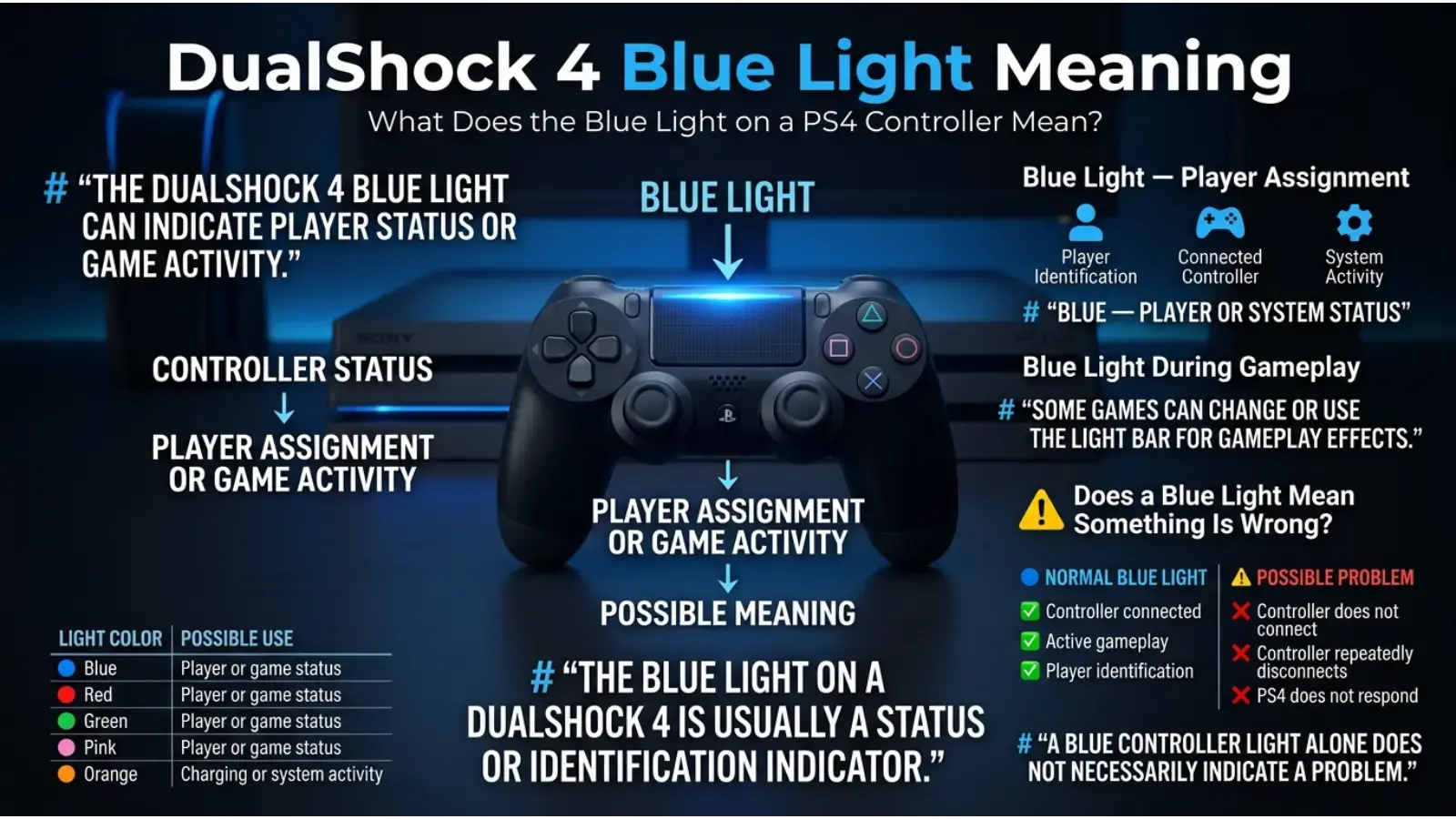
A blue controller light commonly appears when the controller is connected as the first player.
In multiplayer situations, the system may assign different colors to additional players.
Blue is also a familiar technology color. Because it is bright and easy to identify, it works well for showing an active controller connection.
However, the exact behavior of the controller light can depend on the game being played.
Some games use the light bar creatively. A game may change the controller color to reflect:
- Player health
- Police alerts
- Team identity
- Special abilities
- Game events
- Environmental conditions
As a result, controller colors can sometimes be part of gameplay rather than a system warning.
Red PS4 Controller Light Meaning
A red light on a DualShock 4 controller does not necessarily indicate danger.
In many games, red may simply identify a player or represent an in-game event.
Some games also change the controller light to match the situation happening on screen.
For example, developers may use red to suggest danger, damage, combat, or low health.
This use of color follows common psychological associations. Red naturally attracts attention because people often connect it with urgency and intensity.
Still, the exact meaning depends on the game.
Therefore, always consider the game context before assuming that a red controller light means something is wrong.
Green PS4 Controller Light Meaning
Green is often used to identify another player during multiplayer gaming.
Psychologically, green is associated with balance, growth, safety, and success. However, these symbolic meanings do not necessarily explain why the PS4 assigns green to a controller.
The main purpose is practical: players need colors that are easy to distinguish from one another.
Some games may also use green for:
- Health
- Positive status
- Team identification
- Success
- Special abilities
The meaning changes depending on the game design.
Pink PS4 Controller Light Meaning
Pink is another color that may appear on a DualShock 4 controller, particularly for player identification.
The color does not automatically represent a technical problem.
In modern gaming, color choices are often designed to improve visibility and distinguish users quickly.
Pink also creates strong contrast against darker environments, making it useful as a player identification color.
Like blue, red, and green, its exact purpose can change depending on the game.
Why Do PS4 Controller Colors Change?
Controller light colors can change for several reasons.
The system may assign a different player color when multiple controllers are connected. Additionally, games can control the light bar for creative effects.
For example, a game might change the light to reflect danger, health, police attention, or a special gameplay event.
This means the controller light bar acts as both:
- A player identification system.
- An interactive gaming feature.
Because the light can be controlled by software, there is no single universal meaning for every controller color.
PS4 Color Meanings and Color Psychology
Color psychology helps explain why certain colors are effective for communicating system information.
However, color psychology should not be confused with a scientific rule stating that every person reacts to every color in exactly the same way.
People learn many color associations through culture, experience, and design conventions.
Why Blue Works for Technology
Blue is frequently associated with technology, reliability, and digital communication. It also creates a calm visual impression compared with more intense colors.
For this reason, blue is commonly used in electronics, software, and technology branding.
Why White Suggests Normal Operation
White provides strong visibility and often appears clean and neutral. In interface design, it can communicate that a system is active without creating the urgency associated with red.
Why Orange Suggests a Different Power State
Orange stands between the intensity of red and the calm appearance of white. Therefore, it works well for indicating that a device is in an alternative state such as Rest Mode.
Why Red Works as a Warning
Red is highly noticeable and has widespread associations with warning signals, danger, and urgency.
Using red helps users recognize that they should pay attention to the console.
How PS4 Colors Affect Player Perception
Color changes can influence how players interpret a device before they even read a message on the screen.
A player who sees blue may expect the console to be starting.
A white light can provide reassurance that the system is ready.
Orange communicates that the console is resting rather than fully active.
Meanwhile, red can create an immediate sense of concern.
This is an example of visual hierarchy. Designers use color differences to help users recognize information quickly.
The goal is not to create an emotional reaction for its own sake. Instead, the colors make technical information easier to understand.
Why Context Changes PS4 Color Meanings
The same color can mean different things depending on where it appears.
For example:
| Color | Console Meaning | Controller Meaning |
|---|---|---|
| Blue | Startup activity | Player identification or game effect |
| Red | Possible warning or overheating | Player identification or gameplay effect |
| White | Normal system operation | May appear differently depending on software |
| Orange | Rest Mode | Not a standard warning meaning |
| This is why users should avoid interpreting PS4 colors without considering the device component. | ||
| A red light on the console and a red light on the controller should not automatically be treated as the same message. |
The Role of Lighting in PS4 Color Appearance
The surrounding environment can change how PS4 lights appear to your eyes.
A bright room may make orange look lighter, while a dark gaming room can make blue and red lights appear stronger.
Camera settings can also alter colors in photographs and videos.
For example, a smartphone camera may make a PS4’s orange light look more yellow or make a red light appear pink.
Therefore, if you are diagnosing a console issue, observe the actual light directly whenever possible instead of relying only on a photograph.
How Age Can Affect PS4 Color Interpretation
People do not always interpret colors in the same way.
Younger players may associate controller lights with game features, while experienced console owners may focus more on technical meanings.
Personal experience also matters.
A person who previously experienced a console problem after seeing a flashing blue light may feel worried when seeing blue again, even when the console is starting normally.
This shows how experience can influence color perception.
The light itself may have the same technical function, but the emotional response can be different.
Cultural Meaning and PS4 Color Meanings
PS4 system lights are designed primarily as functional signals rather than cultural symbols.
Still, cultural associations can influence how users emotionally react to them.
Red, for example, can represent danger in many warning systems, but it can also represent celebration, luck, energy, or prosperity in different cultural traditions.
White can symbolize purity in some cultures while being associated with mourning in others.
Because of these differences, technology companies generally rely on established device conventions rather than expecting every user to interpret colors symbolically.
The PS4 light system works best because users learn its meaning through repeated use.
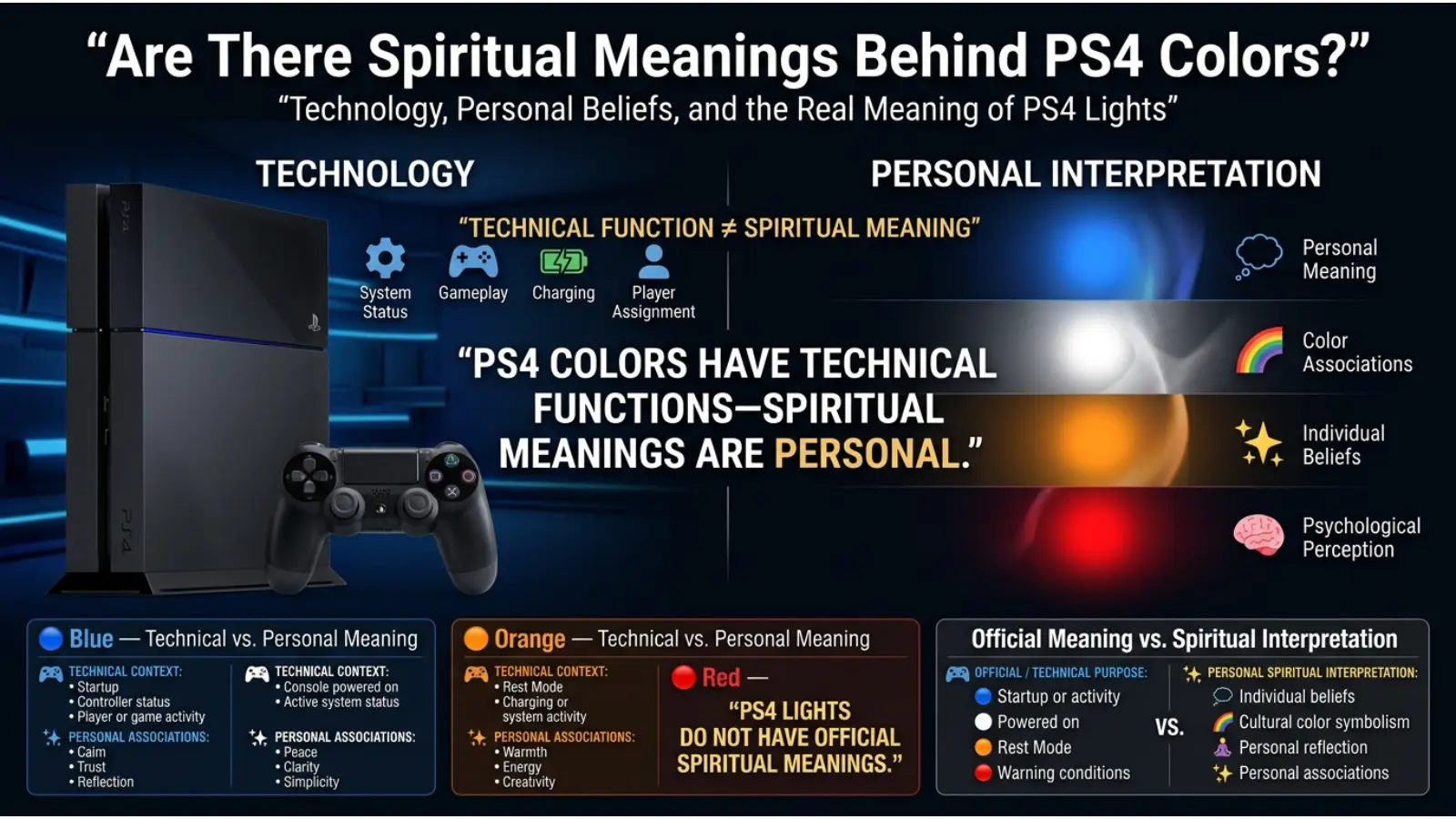
Are There Spiritual Meanings Behind PS4 Colors?
There is no official spiritual meaning behind PS4 console lights.
The colors are used to communicate technical status and system activity.
However, some people personally connect colors with spiritual ideas such as energy, protection, balance, or transformation. These interpretations come from personal beliefs or broader symbolic traditions rather than the design purpose of the PlayStation 4.
For practical troubleshooting, technical explanations should always come first.
A blue or orange PS4 light is best understood by looking at the console’s operating state rather than assigning it a spiritual meaning.
The History of Colored Status Lights in Electronics
Colored lights have been used in electronic devices for decades because they communicate information faster than written instructions.
Red lights commonly became associated with warnings and alerts, while green often suggested safe or active conditions.
As consumer electronics developed, designers expanded the use of colors to create more detailed status systems.
Gaming consoles added another layer by using lights not only for technical communication but also for visual identity.
The PS4’s light design reflects this evolution. Its illuminated strip creates a recognizable appearance while also showing important information about the system’s status.
Why Designers Use Different Colors for Technology
A single light would make it difficult for users to understand what a device is doing.
Different colors allow designers to communicate several conditions without adding complicated text or extra screens.
For example:
- Blue can indicate startup.
- White can indicate normal operation.
- Orange can indicate Rest Mode.
- Red can draw attention to a possible warning.
The colors create a simple visual language.
This approach is especially useful because players may notice the console’s light even when they are not looking directly at the television.
PS4 Colors as a Form of User Experience Design
The PS4 light system is a good example of user experience design.
Good design helps users understand a product with minimal effort.
Instead of requiring players to open a menu to check whether the console is in Rest Mode, the orange light provides an immediate visual answer.
Likewise, the transition from blue to white shows that the startup process has progressed.
The design works because the colors are combined with changes in brightness, flashing patterns, and timing.
Therefore, the full signal includes more than color alone.
Common PS4 Light Patterns
The behavior of the light can be just as important as its color.
Solid Light
A solid light often indicates a stable system state.
Flashing Light
A flashing light usually indicates a transition, activity, or process that requires attention.
Changing Colors
A change from blue to white generally suggests that the PS4 has moved from startup into normal operation.
Persistent Unusual Light
A light that remains stuck on one color while the console fails to function may require troubleshooting.
Always consider both the color and the light pattern.
Common Misconceptions About PS4 Color Meanings
A Blue Light Always Means Something Is Broken
This is false. Blue normally appears during startup. The concern begins when the light continues flashing and the console cannot start properly.
Every Red Controller Light Means Danger
This is also incorrect. Controller colors may identify players or reflect gameplay.
Orange Means the PS4 Is Turned Off
Not exactly. Orange generally indicates Rest Mode, meaning the system is in a low-power state.
The Same Color Always Has the Same Meaning
PS4 colors depend on location, timing, and software. A color on the controller can mean something completely different from the same color on the console.
All PS4 Problems Can Be Identified by Light Color
Light colors provide clues, but they cannot diagnose every technical issue.
How to Respond to Different PS4 Light Colors
If the Light Is Blue
Wait for the console to finish starting. If it changes to white and the system works, there is usually no reason for concern.
If the Light Is White
The console is generally operating normally.
If the Light Is Orange
The PS4 is likely in Rest Mode. Press the power button or use the controller to wake it.
If the Light Is Red
Stop using the console if overheating is suspected. Allow it to cool and check the ventilation area.
If the Light Keeps Flashing
Check whether the television displays an image and whether the system responds. Persistent flashing combined with startup problems may require additional troubleshooting.
Practical Tips for Preventing PS4 Light Problems
Proper console care can reduce the risk of overheating and some technical issues.
Keep the PS4 in an open space with adequate airflow.
Avoid blocking ventilation openings.
Clean dust from the exterior vents carefully.
Protect the console from extreme heat.
Use a stable power source.
Avoid disconnecting power while the system is actively updating or saving data.
Check HDMI cables when display problems occur.
These habits cannot prevent every hardware problem, but they can reduce unnecessary stress on the console.
PS4 Colors in Gaming and Entertainment
The PlayStation 4 uses light as part of its entertainment experience.
Unlike older electronics that used small indicator LEDs hidden on the front panel, the PS4’s illuminated design makes system status more visible.
The DualShock 4 takes this idea further by allowing games to use the light bar as part of gameplay.
This creates a connection between the physical controller and the digital world on screen.
For example, a color change can make a game event feel more immediate because the player receives information through both the screen and the controller.
PS4 Color Meanings in Everyday Use
Understanding PS4 colors can save time and reduce unnecessary worry.
Instead of immediately searching for a technical repair when the console shows orange, you can recognize that it is probably in Rest Mode.
Likewise, seeing blue during startup does not automatically mean something is wrong.
Learning these basic signals helps you respond appropriately.
The most useful habit is to observe three things:
- The color.
- Whether the light is solid or flashing.
- Whether the console is functioning normally.
Together, these details provide a clearer picture than the color alone.
How the PS4 Uses Color as a Communication Tool
The PS4 demonstrates an important principle of design: color works best when it supports other information.
A red light alone might be confusing. However, when combined with system behavior and warning messages, it becomes easier to understand.
Similarly, orange becomes meaningful because users learn that it represents Rest Mode.
Over time, these associations become familiar.
This is how visual systems work in many areas of everyday life, including:
- Traffic signals
- Computer status indicators
- Smartphone notifications
- Vehicle dashboards
- Home appliances
- Gaming devices
The PS4 light system is part of this broader visual language.
Frequently Asked Questions About PS4 Color Meanings
What does a blue light on a PS4 mean?
A blue light usually appears when the PS4 is starting. If it quickly changes to white, the console has likely started normally.
What does a flashing blue light mean on PS4?
A flashing blue light that does not change may indicate a startup problem. Check the HDMI connection and try restarting the console.
What does a white light mean on PS4?
A solid white light generally means the PS4 is powered on and operating normally.
What does an orange light mean on PS4?
An orange light usually means the PS4 is in Rest Mode.
Why is my PS4 showing a red light?
A red light may indicate overheating or another warning condition. Allow the console to cool and check its ventilation.
What do PS4 controller colors mean?
Controller colors can identify different players or be used by games to communicate gameplay information.
Why is my PS4 controller light red?
A red controller light is often a player identification color or an in-game effect. It does not automatically mean the controller is damaged.
Can games change the PS4 controller light color?
Yes. Some games use the DualShock 4 light bar to reflect health, teams, alerts, or other gameplay events.
Does a blue PS4 light always mean the Blue Light of Death?
No. Blue is a normal startup color. The issue is generally associated with persistent flashing blue light and startup failure.
Can I change PS4 console light colors?
The standard console status lights are controlled by the system and are not designed to function as freely customizable decorative lighting.
Final Thoughts on PS4 Color Meanings
Understanding PS4 color meanings makes it easier to recognize what your console is doing without immediately assuming the worst. Blue usually represents the startup process, white generally signals normal operation, and orange indicates Rest Mode. Red deserves greater attention because it may point to overheating or another warning condition. However, the controller’s colors follow a different system and can change based on player identification or game design.
The key lesson is that color alone does not tell the entire story. Look at where the light appears, whether it is solid or flashing, how long it remains visible, and whether the PS4 is functioning normally. Once you understand this visual language, the lights on your PlayStation 4 become useful signals rather than confusing colors.

Emma Wilson is a dedicated comparison writer and product researcher at ColorMystiic.com. She specializes in creating unbiased product comparisons, detailed reviews, and helpful buying guides. Her goal is to help readers make smarter purchasing decisions with confidence.