If you use an Owlet Dream Sock, the color on its Base Station can quickly tell you that something is happening. A green light may appear during normal monitoring, while yellow, blue, lavender, or red can indicate a different type of notification. For a parent checking the device during the night, knowing these signals can make the system much easier to understand.The important thing is that Owlet Dream Sock Color Meanings are not ordinary color symbols.
The company assigns specific functions to its lights. Therefore, the meaning of a red or yellow light on an Owlet device is different from the general meaning people might associate with those colors in psychology, fashion, or culture.
There is also an important detail: Owlet has released different products and versions over time.
This guide explains the main Owlet Dream Sock color meanings, how to understand each signal, what you can check when a notification appears, and why the exact model and app notification matter.
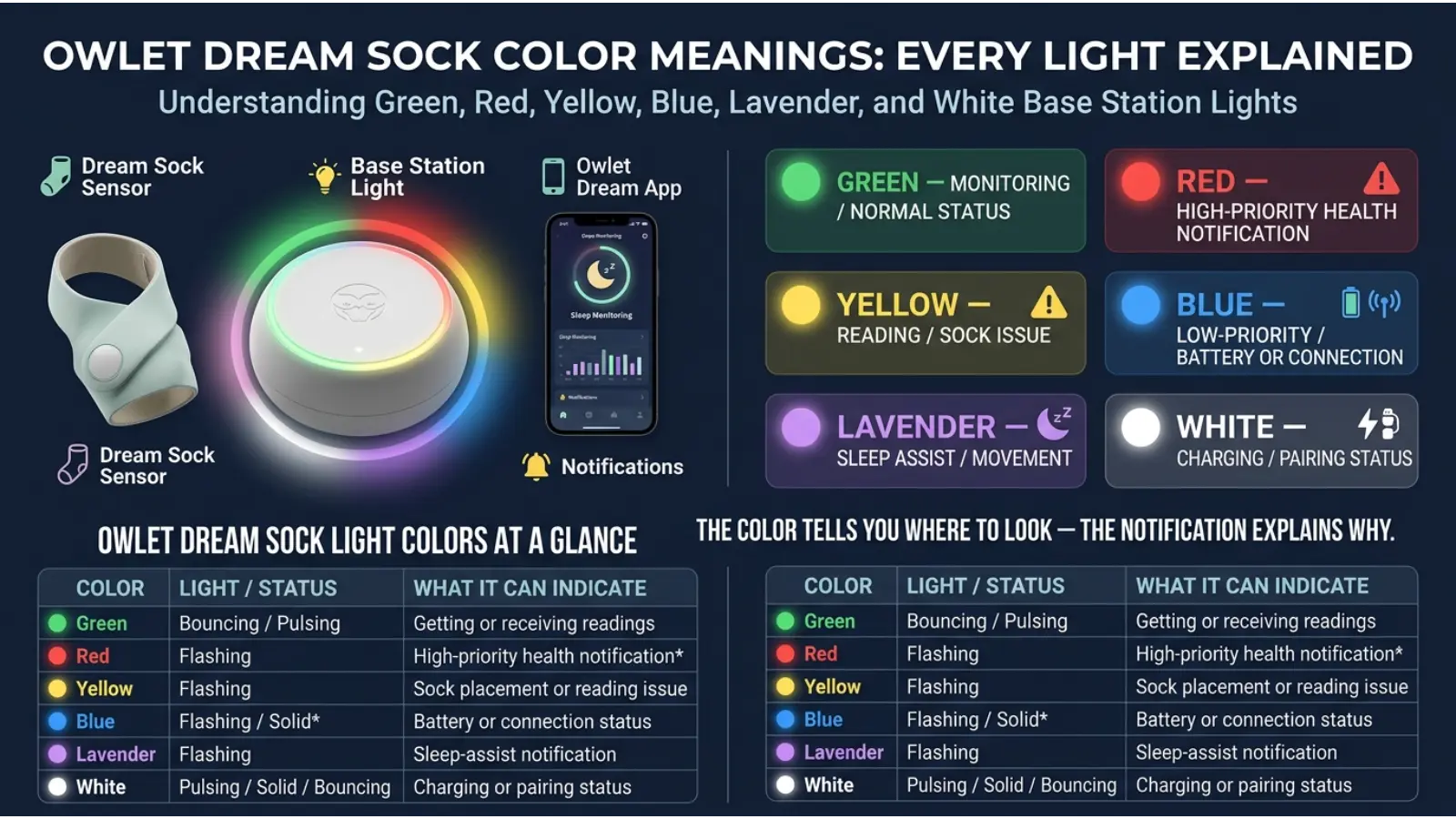
Quick Answer: Green generally means the Sock is obtaining or receiving readings. Blue can indicate a low-priority notification, including low sensor battery on some current Dream Sock configurations. Yellow commonly points to a reading, placement, fit, or connection issue. Lavender is associated with excessive movement or a sleep-related prompt. Red can indicate a high-priority Health Notification when that feature is available and enabled.
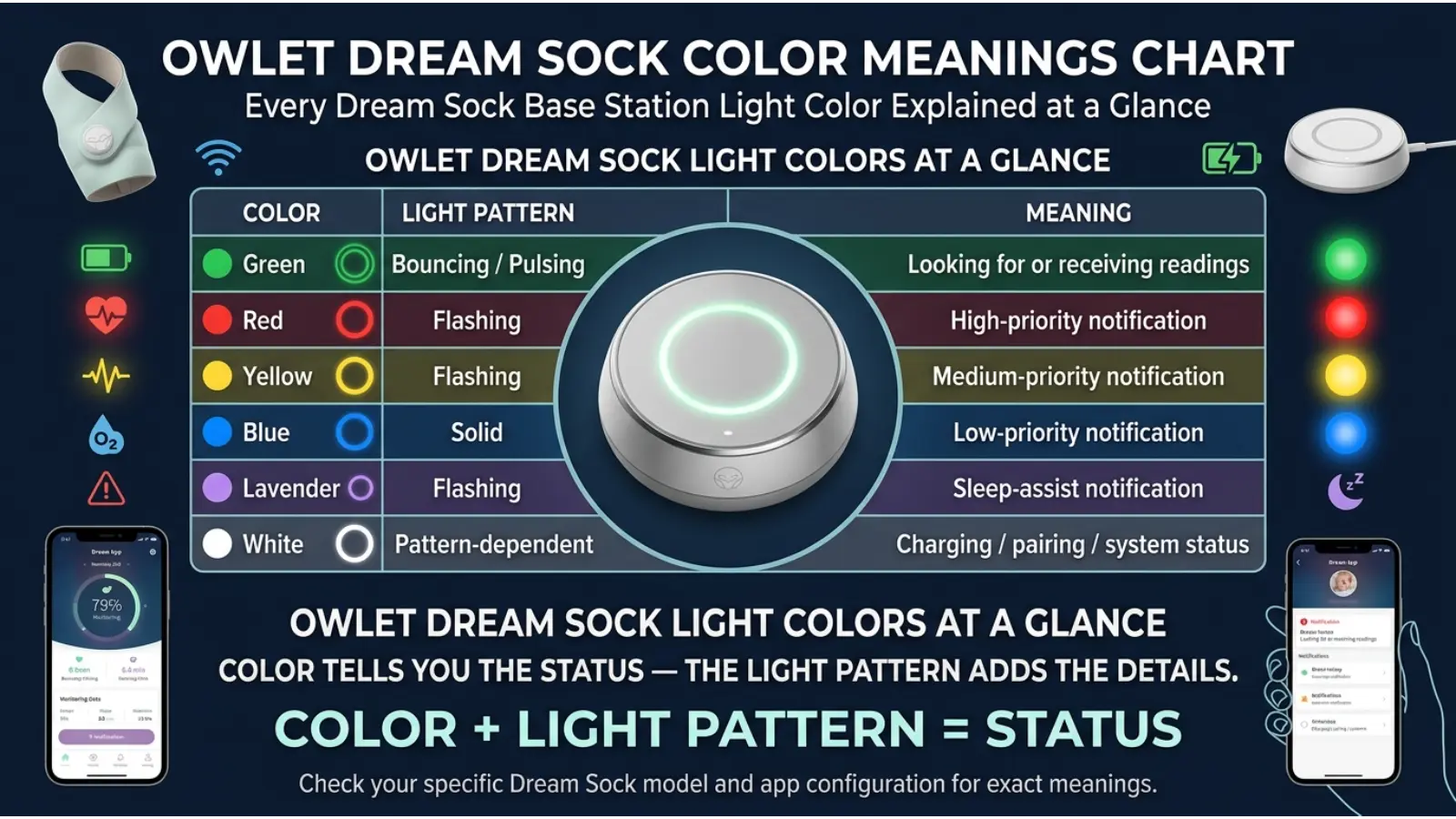
Owlet Dream Sock Color Meanings Chart
| Color | General meaning | What to check |
|---|---|---|
| 🟢 Green | Readings are being obtained or received | Usually continue normal monitoring |
| 🔵 Blue | Low-priority notification | Check the app and sensor battery |
| 🟡 Yellow | Difficulty with readings or Sock setup | Check placement, fit, movement, and connection |
| 🟣 Lavender | Movement or sleep-related prompt | Check your baby’s comfort and movement |
| 🔴 Red | High-priority Health Notification on supported configurations | Check the app and respond appropriately |
These are useful general categories, but the exact behavior can vary by Owlet generation and software configuration. When there is a difference between a general color chart and the notification shown by your device, the notification for your specific model should take priority.
What Does a Green Owlet Dream Sock Light Mean?
🟢 Green is generally the color associated with successful monitoring.
When the Sock is first placed on the baby, the Base Station may use a bouncing green light while it works to obtain readings. Once readings are being successfully collected, the light can pulse green.
This makes green primarily a device-status signal, rather than a statement about the baby’s overall health.
Bouncing Green Light
A bouncing green light generally means the system is working to obtain readings.
If you have just placed the Sock on your baby, give the system some time to establish a reading.
Pulsing Green Light
A softly pulsing green light indicates that the Sock is successfully picking up readings.
For everyday use, this is generally the normal monitoring state parents expect to see.
What Does a Blue Owlet Dream Sock Light Mean?
🔵 Blue is generally used for a lower-priority notification, but the exact meaning depends on the Owlet model and region.
For some current Dream Sock configurations, a blue notification can indicate that the sensor battery is getting low. In that situation, charging the sensor is the obvious next step.
However, older Owlet products have used blue for other conditions, including certain connection and battery situations.
That difference explains why searching for a simple answer such as “What does blue mean on Owlet?” can sometimes produce conflicting information.
What Should You Do When You See Blue?
Start by checking the Owlet app.
The app can provide more specific information than the color itself. If the notification relates to the sensor battery, place the sensor on its Base Station for charging.
If the notification concerns connectivity, check the distance between the Sock and Base Station and make sure the device can communicate properly.
The color is the first clue; the notification message gives you the useful detail.
What Does a Yellow Owlet Dream Sock Light Mean?
🟡 Yellow generally indicates that the system is having difficulty obtaining or maintaining an appropriate reading.
There are several possible reasons.
Movement can also make it harder for the sensor to obtain consistent information.
Common Reasons for a Yellow Notification
A yellow signal can be associated with:
- Incorrect Sock placement
- An unsuitable Sock size
- A loose Sock
- The Sock coming off
- Excessive movement
- Sensor contact problems
- Connection or range issues
Instead of immediately assuming that a yellow light represents a health problem, first check the physical setup.
How to Troubleshoot Yellow
Look at the Sock before changing anything else.
Make sure you are using the correct Sock and size. Then check its position on the foot and make sure it has not shifted.
If your baby is awake and moving around, the movement itself may contribute to the notification.
If everything appears correct but yellow notifications continue, check the app for additional information and follow the troubleshooting guidance for your particular model.
What Does a Lavender Owlet Dream Sock Light Mean?
🟣 Lavender is different from the typical technical warning colors because it can relate to movement and sleep.
A lavender notification can occur when the child has been moving excessively for an extended period. In practical terms, this can be a reason to check whether the baby is comfortable or needs help settling.
For example, the baby might be awake, restless, or simply moving more than usual.
Lavender Does Not Mean “Spiritual” or “Calm”
Lavender has peaceful and relaxing associations in traditional color psychology. However, that is not why Owlet uses the color.
On an Owlet device, lavender has a programmed notification meaning.
This is a useful example of why color context matters. The same purple family can symbolize relaxation in interior design while communicating a completely different message on a monitoring device.
What Does a Red Owlet Dream Sock Light Mean?
🔴 Red deserves particular attention because, on supported Dream Sock configurations with Health Notifications enabled, it can indicate a high-priority health notification.
The notification can relate to pulse rate or oxygen saturation reaching a preset notification threshold.
What Should You Do With a Red Notification?
First, check the specific information provided by the device.
Then look at your baby rather than relying exclusively on the monitor.
If your baby appears seriously unwell, has difficulty breathing, is unusually difficult to wake, or you believe there is an emergency, seek appropriate medical assistance.
A wearable monitor provides information, but it cannot diagnose every medical situation.
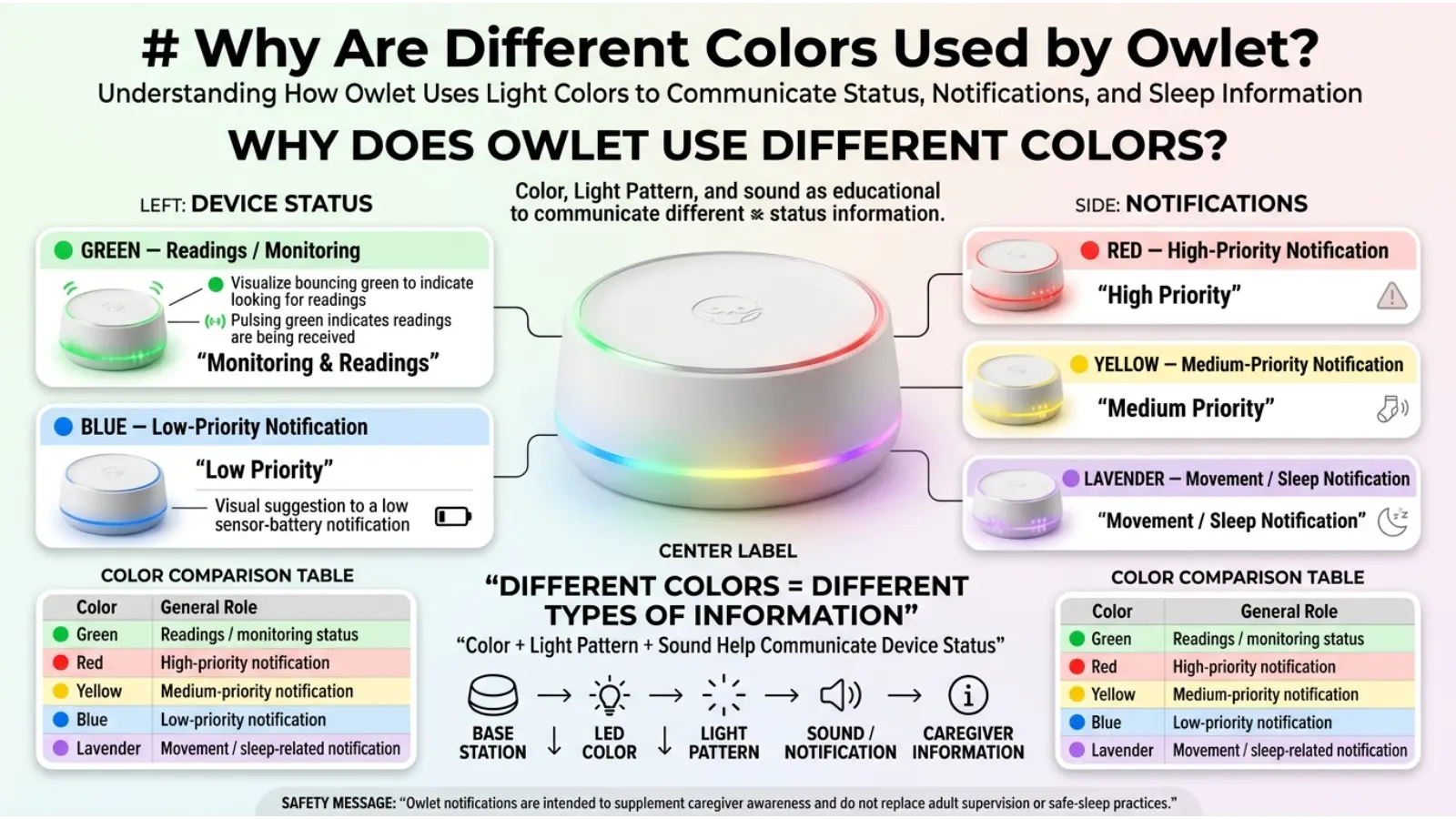
Why Are Different Colors Used by Owlet?
Colors are an efficient way to communicate information quickly.
Imagine checking a device in a dark room. Reading a long message would take more effort than recognizing a bright visual signal.
Different colors allow the device to separate different categories of information.
Green can represent normal monitoring.
Yellow can draw attention to a technical or reading problem.
Blue can identify a lower-priority notification.
Lavender can signal a sleep-related prompt.
Red can attract immediate attention to a high-priority notification when applicable.
This approach is similar to the way many digital interfaces use colors to organize information.
Owlet Dream Sock Color Meanings Are Not the Same as Color Psychology
This distinction is especially important for anyone researching color meanings.
Traditional color psychology discusses how people may respond to colors such as blue, red, green, or yellow. However, an electronic device can assign its own meaning to those colors.
For example:
| Color | Common color association | Owlet context |
|---|---|---|
| 🟢 Green | Safety, nature, balance | Monitoring/readings |
| 🔵 Blue | Calm, trust, peace | Device notification |
| 🟡 Yellow | Caution, attention | Reading/setup issue |
| 🟣 Lavender | Calm, creativity | Sleep/movement prompt |
| 🔴 Red | Urgency, danger | High-priority notification |
The two systems should not be confused.
General symbolism explains how people may perceive colors. Owlet’s software determines what its colors mean on the device.
Why the Same Owlet Color Can Mean Something Different
One reason parents encounter conflicting explanations online is that Owlet products have changed over time.
Different generations may have different notification systems, features, and settings.
This is particularly important when a parent searches for a solution after seeing an unexpected color.
Check Your Exact Owlet Model
Before troubleshooting, identify the specific Owlet product you own.
Then use the instructions and notifications associated with that model.
This small step can prevent unnecessary confusion because a color may have a different purpose across product generations.
Why Your Owlet Color May Look Different at Night
The appearance of an LED can change depending on the surrounding light.
A blue light may look much stronger in a dark bedroom. Lavender can appear more purple or pink depending on the brightness and surrounding colors.
This does not necessarily mean that the device is producing a different notification.
Human vision adapts to surrounding lighting, so small differences in color appearance are normal.
When identifying an Owlet notification, focus on the broad color category and, more importantly, the associated sound or app message.
Can Green Mean My Baby Is Completely Safe?
No.
A green monitoring signal should not be interpreted as a guarantee that nothing can happen to your baby.
The device is designed to provide monitoring information. It does not replace adult supervision, safe-sleep practices, or medical care.
This is an important difference between “the device is receiving readings” and “the baby is completely safe.”
The first is a device-status statement. The second is a much broader medical claim that a monitoring light cannot establish by itself.
Does a Yellow Light Mean Something Is Wrong With My Baby?
Not necessarily.
Yellow can be related to the Sock itself, its placement, movement, or the device’s ability to obtain readings.
For that reason, parents should first check the physical setup and read the specific app notification.
A yellow light should not automatically be treated as a medical diagnosis.
Does a Red Light Always Mean an Emergency?
No.
A red Health Notification means the device has detected a condition that meets its programmed notification criteria on supported configurations.
It does not automatically explain why that reading occurred.
The baby’s actual condition matters. If the baby looks seriously ill or you have an urgent concern, seek medical help rather than depending only on the monitor.
Why Does My Owlet Keep Showing Yellow?
Repeated yellow notifications can have several possible causes.
Start by checking the Sock’s placement and size. Then look for movement or signs that the Sock has shifted.
Also consider whether the sensor has appropriate contact with the foot.
If the notification keeps returning even after you have checked these factors, use the app’s troubleshooting information for your particular model.
Repeated notifications are worth investigating instead of simply ignoring them.
Why Does My Owlet Keep Showing Blue?
A blue notification can have different meanings depending on the device.
On some current Dream Sock configurations, it can indicate a low sensor battery.
On older Owlet products, blue has also been associated with other conditions.
Therefore, if your Owlet is blue, check the notification displayed by the app rather than relying on a color chart designed for a different model.
Why Is My Owlet Showing Lavender?
Lavender is generally associated with excessive movement or a sleep-related prompt on applicable Dream Sock systems.
Check whether your baby is awake, restless, uncomfortable, or moving more than usual.
If the baby is simply awake and active, the notification may reflect that activity rather than a problem with the Sock itself.
Why Does My Owlet Turn Green Then Another Color?
A change in color can happen because the device’s status has changed.
For example, the system may initially search for readings and then successfully obtain them. Later, movement, placement, battery level, connectivity, or another condition can trigger a different notification.
Instead of focusing only on the color change, look at what happened immediately before it.
That context can often explain the notification.
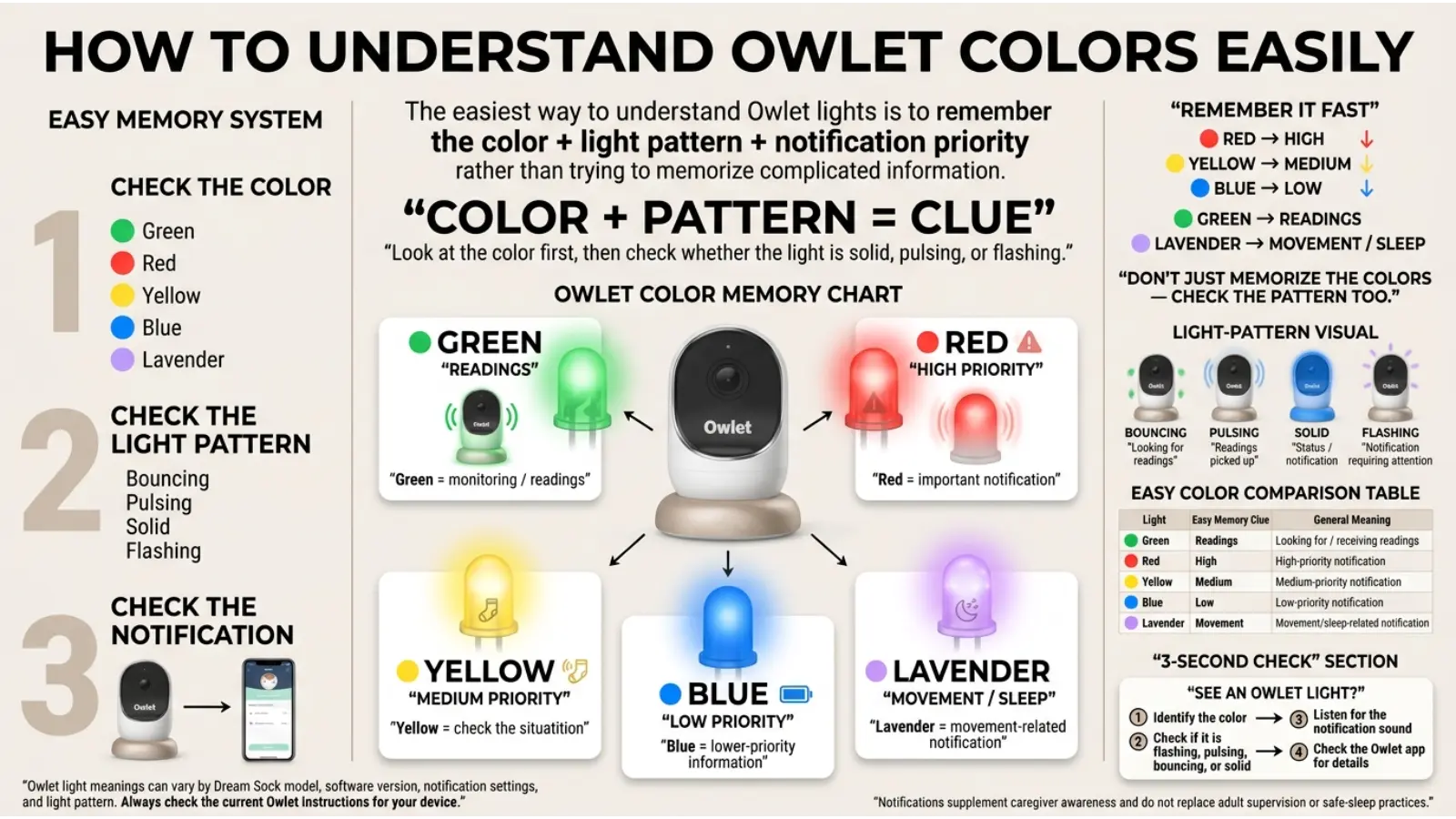
How to Understand Owlet Colors More Easily
You do not need to memorize every technical detail.
A simple mental system works well:
Green = readings
Blue = check the low-priority notification
Yellow = check the Sock/setup
Lavender = check movement and sleep
Red = check the health notification promptly
This is only a quick memory aid. When there is uncertainty, use the exact notification shown for your device.
Owlet Dream Sock Color Meanings in Everyday Parenting
The value of understanding the lights is not simply knowing what each color is called.
It is about responding calmly.
If you see green, there is usually no reason to interrupt the monitoring session just because the light is visible.
If you see yellow, check the Sock before assuming something serious has happened.
The you see blue, look for the relevant low-priority notification.
If you see lavender, check whether your baby is moving or unsettled.
If you see red, examine the specific notification and the baby’s condition promptly.
This approach reduces unnecessary panic while still encouraging appropriate attention when a notification deserves it.
Common Mistakes When Reading Owlet Colors
Mistake 1: Using an Old Color Chart
Older Owlet products can have different light meanings.
Always match information to your specific product.
Mistake 2: Assuming Color Psychology Explains the Device
A purple light does not automatically mean peace, and a red light does not simply mean danger.
The manufacturer defines the device’s signals.
Mistake 3: Ignoring the App
The Base Station color provides a quick visual signal, but the app can provide additional context.
Mistake 4: Treating Every Notification as a Medical Emergency
Some notifications concern battery, placement, connection, movement, or sleep.
Understanding the category can help you respond appropriately.
Mistake 5: Treating Green as a Guarantee
A functioning monitoring signal is not the same as a guarantee of safety.
Owlet Dream Sock Color Meanings and the Importance of Context
Color almost never has one universal meaning.
A red traffic signal, a red dress, red packaging, and a red medical alert can all communicate very different ideas.
The same principle applies to Owlet.
The meaning comes from the color plus the system using it.
This is why studying color symbolism without considering context can lead to incorrect conclusions.
Frequently Asked Questions
What are the main Owlet Dream Sock colors?
The main colors discussed for current Dream Sock notifications include green, blue, yellow, lavender, and red. Their exact meanings depend on the device version and available features.
What does green mean on the Owlet Dream Sock?
Green generally indicates that the system is obtaining or successfully receiving readings.
What does blue mean on the Owlet Dream Sock?
Blue is used for a lower-priority notification on some current Dream Sock configurations, including a low sensor battery notification. Older Owlet models may use blue differently.
What does yellow mean on the Owlet Dream Sock?
Yellow generally indicates that the system is having difficulty obtaining readings or that there may be an issue with placement, fit, movement, or connection.
What does lavender mean on the Owlet Dream Sock?
Lavender is associated with excessive movement or a sleep-related prompt on applicable Dream Sock configurations.
What does red mean on the Owlet Dream Sock?
Red can indicate a high-priority Health Notification involving pulse rate or oxygen saturation on supported configurations when Health Notifications are enabled.
Is green on Owlet a good sign?
Green generally means that the device is obtaining or receiving readings. However, it should not be interpreted as a guarantee that a baby is completely safe.
Should I worry about a yellow Owlet light?
Not automatically. Yellow can be caused by placement, fit, movement, or reading problems. Check the Sock and the app notification first.
Why do different websites give different Owlet color meanings?
The most common reason is that they may be describing different Owlet generations. Owlet’s products and notification systems have changed, so information for one model may not apply to another.
Can Owlet colors be understood through color psychology?
Only in a very general way. Color psychology can explain why colors such as red and green are useful for visual alerts, but Owlet’s specific meanings come from the device’s notification system.
Conclusion
The easiest way to understand Owlet Dream Sock color meanings is to think of the Base Station as a visual communication system.
Green generally relates to obtaining or receiving readings. Blue can represent a lower-priority notification on certain current configurations. Yellow usually tells you to check the Sock, readings, placement, or connection. Lavender can point toward movement or a sleep-related prompt. Red can represent a high-priority Health Notification when the applicable feature is enabled.
However, the color alone is never the complete story. Your exact Owlet model, the app notification, the device’s settings, and your baby’s condition all provide important context.
Most importantly, an Owlet Sock is a monitoring tool, not a replacement for attentive caregiving, safe-sleep practices, or professional medical care. Understanding its colors can help you use the device more confidently while keeping its role in proper perspective.

Emma Wilson is a dedicated comparison writer and product researcher at ColorMystiic.com. She specializes in creating unbiased product comparisons, detailed reviews, and helpful buying guides. Her goal is to help readers make smarter purchasing decisions with confidence.