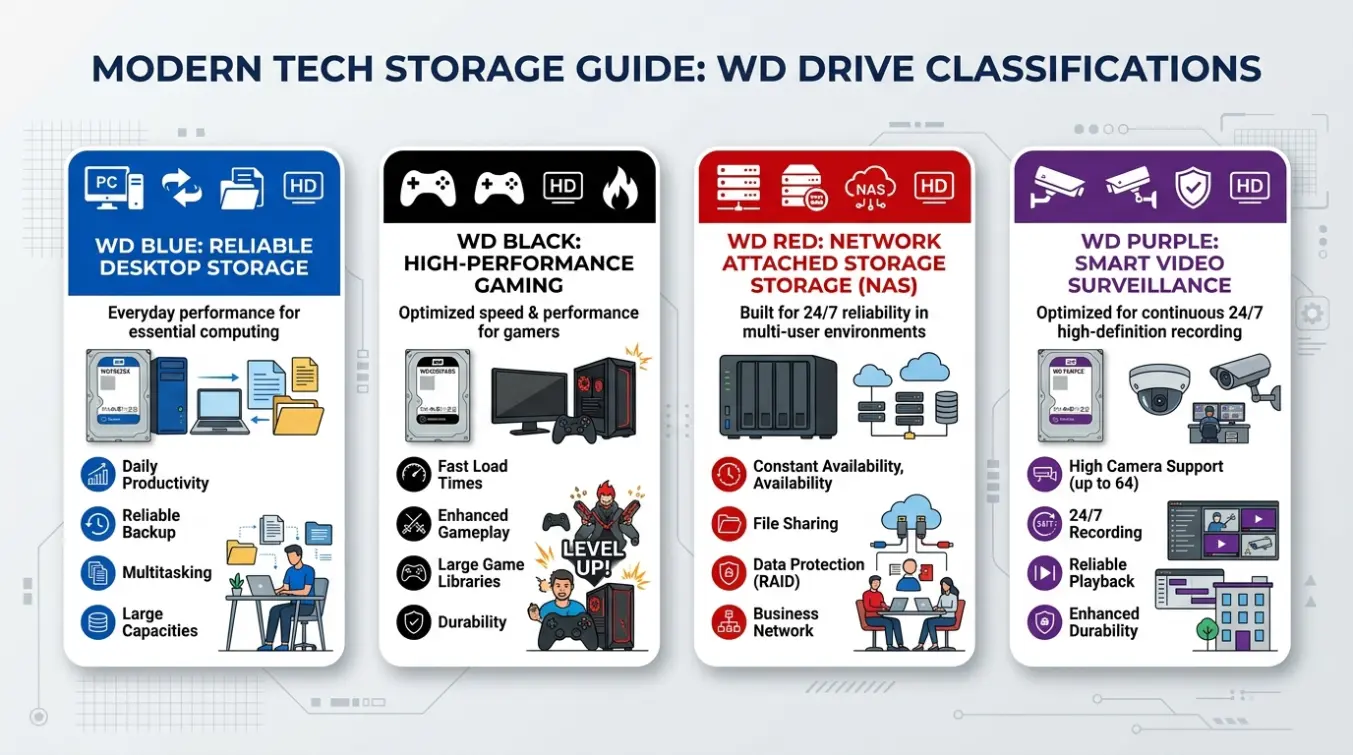
If you have ever compared Western Digital hard drives, you have probably noticed names such as WD Blue, WD Black, WD Red, WD Purple, and WD Gold. These colors are not simply decorative. They are part of Western Digital’s product-family system, designed to help users understand what a drive is optimized to do.That makes WD color meanings different from traditional color psychology. Here, the colors communicate purpose, performance level, workload, and intended environment rather than emotions or personality.
Western Digital’s current internal-drive portfolio includes color families such as Blue, Black, Red, Purple, Gold, and WD_BLACK. (Western Digital Documents)
The important point is that the color alone does not tell you every technical specification. Capacity, interface, recording technology, workload rating, warranty, RPM, and exact model all matter.
Quick Answer: WD color meanings identify the intended use of Western Digital drives. Blue is aimed at everyday computing, Black at performance and gaming, Red at NAS storage, Purple at surveillance and video workloads, and Gold at demanding enterprise environments. Exact specifications vary by model. (Western Digital Documents)
WD Color Meanings at a Glance
| WD Color | Main Meaning | Typical Use | What It Emphasizes |
|---|---|---|---|
| WD Blue | Everyday performance | PCs, general storage | Balance |
| WD_BLACK | High performance | Gaming, demanding workloads | Speed and performance |
| WD Red | NAS storage | Home and small-business NAS | Network storage |
| WD Red Plus | NAS with stronger workload support | NAS systems | Reliability and workload handling |
| WD Red Pro | Professional NAS | Business and larger NAS environments | Higher workload capability |
| WD Purple | Surveillance storage | Security cameras, NVRs | Continuous video workloads |
| WD Purple Pro | Advanced surveillance | AI/video analytics | Heavy video and AI workloads |
| WD Gold | Enterprise storage | Data centers and business systems | High-demand workloads |
What Do WD Colors Actually Mean?
The easiest way to understand WD color meanings is to think of each color as a product category.
A WD Blue drive is not necessarily “better” or “worse” than a WD Red drive. Instead, the two are built around different jobs. A NAS drive, for example, has requirements that differ from those of a desktop PC.
Buying it simply because the color sounds attractive would miss the reason the product exists.
Therefore, the best WD drive is not automatically the fastest one. The best drive is the one whose design matches your workload.
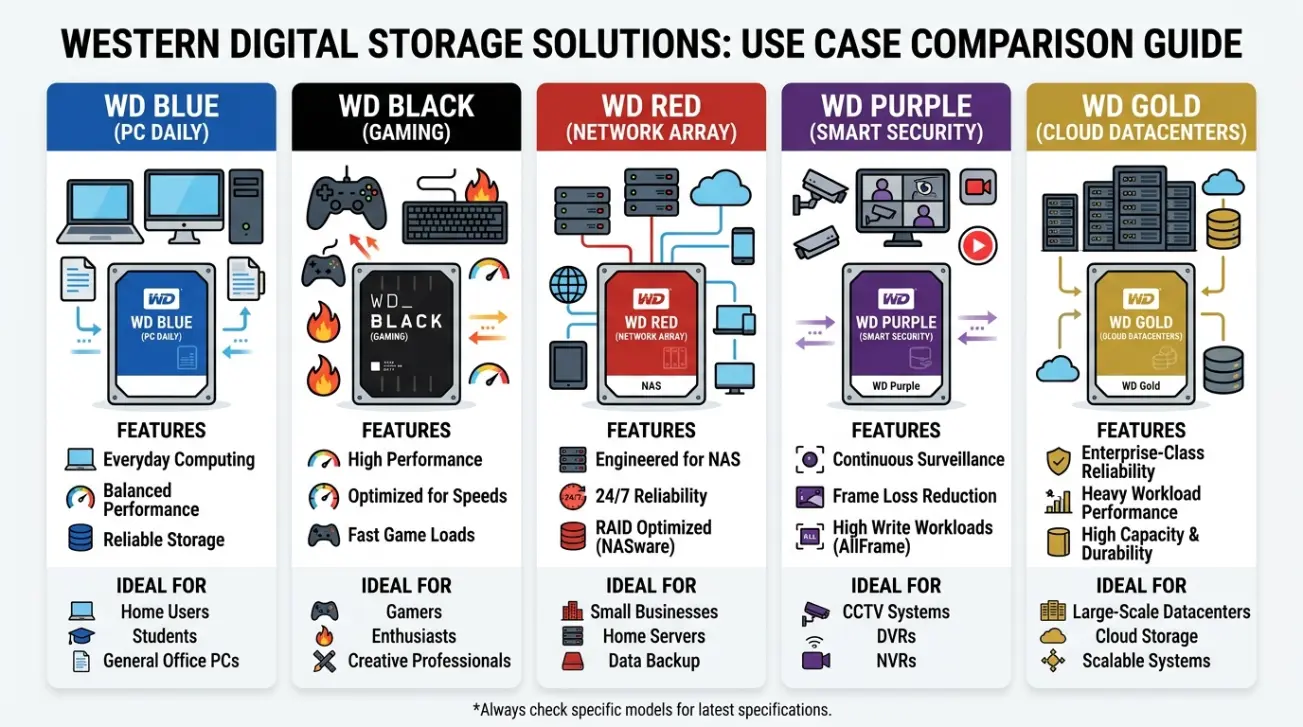
WD Blue Color Meaning: Everyday Computing and Balance
WD Blue generally represents Western Digital’s mainstream storage family for everyday computing.
It is associated with a practical balance between performance, capacity, and price. Depending on the exact model, WD Blue products can be used for desktop computers, additional storage, and general-purpose computing. Western Digital’s portfolio lists WD Blue among its general-purpose internal HDD offerings. (Western Digital Documents)
What is WD Blue good for?
WD Blue can make sense for:
- Everyday desktop computers
- General file storage
- Documents and photos
- Media libraries
- Secondary storage
- General home computing
A 2.5-inch WD Blue drive and a 3.5-inch WD Blue drive can have different capacities, speeds, and power characteristics.
WD Blue in simple terms
Think of Blue as the everyday choice.
If you need storage for ordinary computing rather than a specialized environment, this family is often where you begin your comparison.
WD_BLACK Color Meaning: Performance, Gaming, and Demanding Workloads
WD_BLACK represents a performance-oriented product family.
The black branding is strongly associated with gaming and demanding computing. Western Digital’s current internal-drive portfolio specifically identifies WD_BLACK as a gaming-focused HDD family. (Western Digital Documents)
Why choose WD_BLACK?
It can be relevant for users who care about:
- Gaming
- High-performance computing
- Large files
- Content creation
- Demanding applications
- Performance-focused storage
The important distinction is that WD_BLACK is not simply “the fastest WD drive.” SSD and HDD models have different characteristics, and the exact model determines actual performance.
For example, a WD_BLACK SSD and WD_BLACK HDD belong to the same performance-oriented family but use very different storage technologies.
WD_BLACK in simple terms
Black = performance-focused storage.
It is designed for users who place greater emphasis on performance than someone buying a basic general-purpose drive.
WD Red Color Meaning: NAS and Network Storage
WD Red is associated with NAS, or Network Attached Storage.
NAS systems allow multiple computers and devices to access shared storage over a network. That environment creates different requirements from a typical desktop PC.
Western Digital’s portfolio separates WD Red Plus and WD Red Pro into NAS categories, with Red Plus positioned for home and small-business NAS environments and Red Pro for larger or more demanding business NAS use. (Western Digital Documents)
WD Red
WD Red is intended for network-storage environments rather than being a general desktop recommendation.
A NAS might be used to store:
- Family photos
- Business documents
- Backups
- Media libraries
- Shared files
- Work-related data
WD Red Plus
The WD Red Plus is designed for NAS environments with greater workload requirements than basic home storage.
WD Red Pro
The WD Red Pro is aimed at more demanding NAS environments, including medium and larger business deployments. Western Digital’s comparison lists Red Pro with support for larger NAS environments and a higher workload specification than Red Plus. (Western Digital Documents)
WD Red in simple terms
Red = network storage.
The different Red versions then help distinguish between levels of NAS workload and environment.
WD Purple Color Meaning: Surveillance and Video
WD Purple is one of the clearest examples of a color representing a specialized workload.
What makes surveillance different?
A surveillance system may continuously write video data from several cameras.
That means storage must be considered in terms of:
- Continuous recording
- Multiple video streams
- Camera count
- Retention period
- Recording resolution
- NVR compatibility
- Workload
This is why choosing a drive for a security-camera system requires more than looking at capacity.
WD Purple Pro
WD Purple Pro extends the family toward more demanding surveillance environments, including AI and deep-learning applications. (Western Digital Documents)
WD Purple in simple terms
Purple = surveillance and video workloads.
WD Gold Color Meaning: Enterprise Storage
WD Gold represents enterprise-oriented storage.
Enterprise environments can involve demanding workloads, large numbers of users, data centers, and systems that operate under much heavier conditions than an ordinary home PC.
Western Digital’s current portfolio places WD Gold alongside its enterprise-oriented internal storage products. (Western Digital Documents)
Who might need WD Gold?
It can be relevant to:
- Data centers
- Enterprise storage systems
- Business infrastructure
- High-demand workloads
- Professional server environments
However, enterprise storage decisions should never be based on color alone. Exact model specifications, workload ratings, compatibility, warranty, performance, and system requirements should all be checked.
WD Gold in simple terms
Gold = enterprise-focused storage.
It represents a different storage environment rather than simply “a more expensive Blue.”
WD Green Color Meaning: Energy-Efficient and Legacy Context
WD Green appears in Western Digital’s broader history of color-coded drives and remains relevant when discussing older products and certain SSD products.
Western Digital’s support documentation still references WD Green among its colored-drive families. (Western Digital)
However, the Green name should be handled carefully because the product lineup has changed over time.
Older WD Green HDDs are not equivalent to today’s Green SSD products. Therefore, when researching a specific WD Green drive, always check its exact model number.
WD Green in simple terms
Green = an older/energy-conscious product-family identity, but model context matters.
This is one of the best examples of why WD color meanings should not be treated as permanent rules for every generation.
Why Western Digital Uses Colors
Color coding solves a practical problem.
Storage products can have complicated specifications. A buyer may not immediately understand the difference between a general-purpose desktop drive, a NAS drive, and a surveillance drive.
Product families provide a quick visual signal.
For example:
Blue → everyday computing
Black → performance
Red → NAS
Purple → surveillance
Gold → enterprise
The color is therefore a starting point, not a replacement for reading specifications.
WD Colors Are Not a Simple Performance Ranking
One common mistake is assuming that the colors create a ladder like this:
Blue → Red → Purple → Black → Gold
That interpretation is misleading.
These products are optimized for different jobs.
A Purple surveillance drive may be a better choice than a Black drive for a security-camera recorder, even though Black has a performance-oriented reputation.
Similarly, Red can be more appropriate than Black for a NAS.
The correct question is not:
“Which WD color is best?”
Instead ask:
“Which WD product is designed for my workload?”
WD Color Meanings and CMR vs. SMR
Drive technology adds another layer to the decision.
CMR means Conventional Magnetic Recording, while SMR means Shingled Magnetic Recording. These technologies can affect how a hard drive behaves under different workloads.
Western Digital specifically advises checking the product data sheet to determine whether a particular internal drive uses CMR or SMR. The company lists Red, Blue, Purple, Gold, and WD_BLACK models among the families for which the exact data sheet should be checked. (Western Digital)
This leads to an important rule:
Never assume the recording technology from the color alone.
Check the exact model.
WD Color Meaning in Real-World Examples
Imagine you are building a computer for ordinary schoolwork, browsing, documents, and photos.
A mainstream WD Blue product may be a logical category to investigate.
Now imagine you are building a gaming PC and performance matters more.
You would likely compare WD_BLACK options.
For a home NAS containing family photos and backups, WD Red Plus may be more relevant.
For a business storage environment, WD Gold may belong in the comparison.
The color becomes useful because it quickly directs you toward the appropriate product family.
How to Choose the Right WD Color
Use this simple decision guide:
Choose WD Blue if…
You need general-purpose storage for a computer or everyday files.
Choose WD_BLACK if…
Gaming or performance-oriented computing is a major priority.
Choose WD Red if…
The drive will operate inside a NAS environment.
Choose WD Red Plus if…
You need NAS storage with a more substantial workload capability.
Choose WD Red Pro if…
You are building or expanding a more demanding business NAS.
Choose WD Purple if…
Your main workload is continuous surveillance video.
Choose WD Purple Pro if…
Your surveillance system involves more advanced video, AI, or deep-learning workloads.
Choose WD Gold if…
You are evaluating enterprise-class storage for demanding business infrastructure.
These categories are based on Western Digital’s current portfolio positioning, but exact specifications vary by model. (Western Digital Documents)
WD Color Meanings Chart
| Color | Primary Association | Best Starting Point For | Key Idea |
|---|---|---|---|
| 🔵 Blue | General computing | PCs and everyday storage | Balanced use |
| ⚫ Black | Performance | Gaming and demanding computing | Performance-focused |
| 🔴 Red | NAS | Network storage | NAS-oriented |
| 🔴 Red Plus | NAS | Home/small-business NAS | Higher workload capability |
| 🔴 Red Pro | Professional NAS | Business NAS | More demanding environments |
| 🟣 Purple | Surveillance | NVR/security cameras | Video recording |
| 🟣 Purple Pro | Advanced surveillance | AI/video systems | Heavy video workloads |
| 🟡 Gold | Enterprise | Data centers/business | Enterprise workloads |
| 🟢 Green | Energy-conscious/legacy family | Certain SSDs and older products | Model-specific |
The chart summarizes product-family positioning, not a universal ranking of drive quality. Exact specifications should always be checked for the individual model. (Western Digital Documents)
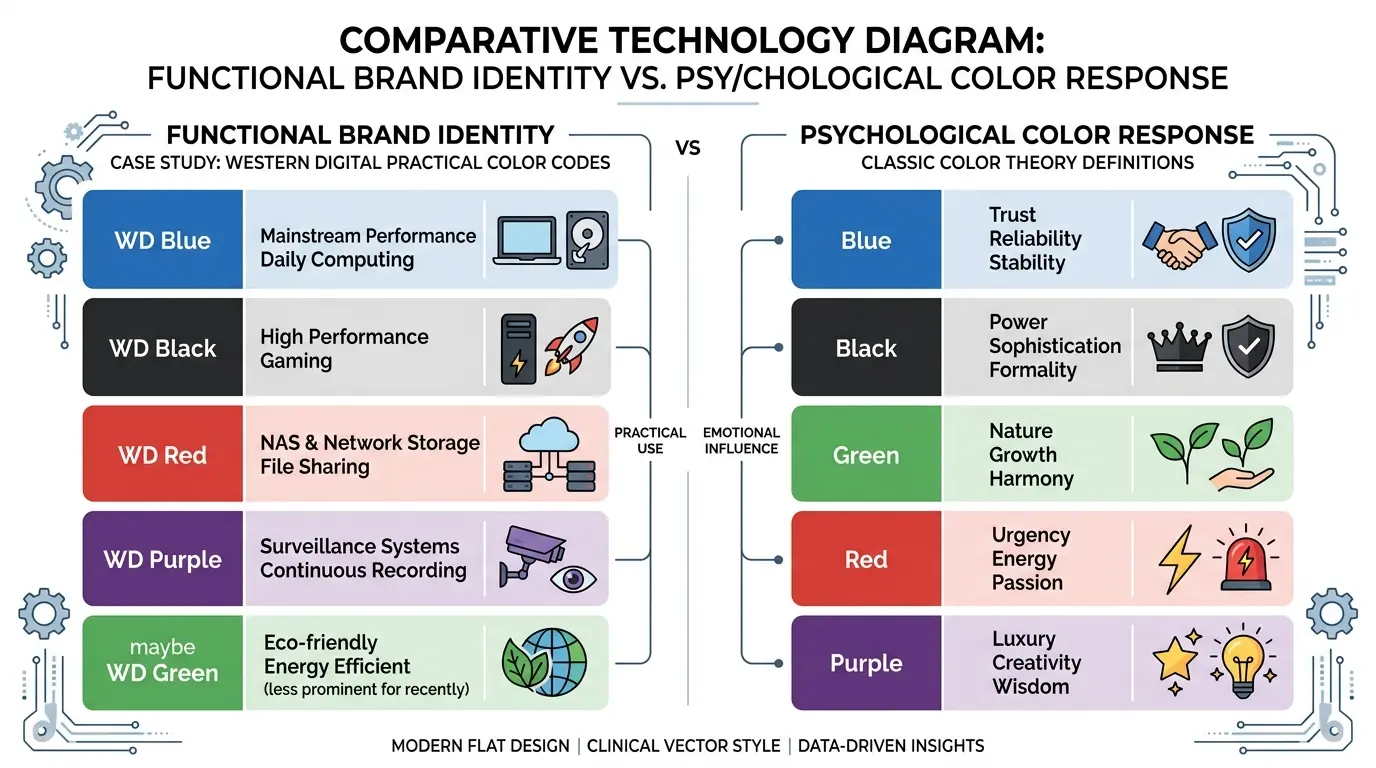
WD Color Meanings vs. Traditional Color Psychology
This distinction is easy to miss.
In traditional color symbolism, blue might represent calmness, trust, or stability. Red may suggest energy or urgency. Gold can suggest wealth or prestige.
Western Digital uses some of these familiar associations in its visual branding, but the actual WD color system has a more practical purpose.
The color tells you about the product family and intended workload.
So, when someone searches for WD color meanings, they are usually looking for technical product information rather than psychological symbolism.
Common Misconceptions About WD Drive Colors
“Black is always the best.”
Not necessarily.
Black is performance-oriented, but a NAS or surveillance system needs a drive designed for its particular workload.
“Red means the drive is faster.”
Red primarily communicates NAS positioning. It does not simply mean “faster than Blue.”
“Purple is only for cameras.”
Purple is strongly associated with surveillance and video workloads, but the exact capabilities depend on the model.
“Gold means unlimited reliability.”
No storage device is immune to failure. Enterprise-oriented design does not eliminate the need for backups, monitoring, and proper infrastructure.
“The color tells me whether the drive is CMR.”
It does not reliably do so. Western Digital recommends checking the specific product data sheet. (Western Digital)
Why the Exact WD Model Number Matters
Two drives can share the same color family while having different capacities, interfaces, speeds, technologies, and workload specifications.
For that reason, a good buying process looks like this:
1. Identify your workload.
Gaming? Desktop storage? NAS? Surveillance? Enterprise?
2. Choose the appropriate WD family.
3. Compare exact models.
4. Check capacity and interface.
5. Check recording technology where relevant.
6. Review workload rating and warranty.
7. Confirm compatibility with your system.
This approach is much safer than choosing a drive based only on its color.
WD Color Meanings in Everyday Storage Decisions
The color system can save time when you are standing in front of several storage options.
For example, a casual PC user does not need to start by comparing dozens of enterprise specifications. The Blue family immediately points toward general-purpose storage.
Likewise, someone building a surveillance recorder can begin with Purple rather than comparing every consumer hard drive on the market.
That is the real value of the WD color system: it narrows the search before the technical comparison begins.
FAQ About WD Color Meanings
What does WD Blue mean?
WD Blue is Western Digital’s mainstream product family for general-purpose computing and storage. Exact specifications depend on the individual model. (Western Digital Documents)
What does WD Black mean?
WD_BLACK is Western Digital’s performance-focused family, particularly associated with gaming and demanding computing workloads. (Western Digital Documents)
What does WD Red mean?
WD Red is associated with NAS storage. Red Plus and Red Pro provide different levels of NAS-oriented capability and are intended for different environments. (Western Digital Documents)
What does WD Purple mean?
WD Purple is designed for surveillance and smart-video workloads, including NVR applications. Purple Pro targets more advanced video and AI-related workloads. (Western Digital Documents)
What does WD Gold mean?
WD Gold represents Western Digital’s enterprise-oriented storage family for demanding business and data-center environments. (Western Digital Documents)
Is WD Black better than WD Blue?
Not automatically. WD Black is performance-focused, while WD Blue targets general-purpose use. The better choice depends on your workload.
Is WD Red good for a normal PC?
A NAS-oriented drive can technically be used in some desktop situations, but it is designed around a different workload. For a normal PC, compare products according to your actual needs rather than assuming Red is better.
Which WD color is best for gaming?
WD_BLACK is the family most directly positioned toward gaming and performance-focused storage. However, the exact SSD or HDD model matters more than the color name alone. (Western Digital Documents)
Which WD color is best for CCTV?
WD Purple is specifically positioned for surveillance and video workloads, making it the natural WD family to investigate for CCTV/NVR storage. (Western Digital Documents)
Does WD color determine CMR or SMR?
No. Western Digital recommends checking the exact product data sheet to determine the recording technology of a particular drive. (Western Digital)
Final Thoughts on WD Color Meanings
WD color meanings are really workload meanings. Blue points toward everyday computing, Black toward performance, Red toward NAS, Purple toward surveillance, and Gold toward enterprise storage.
The smartest way to use this system is to treat the color as your first filter, not your final buying decision. Once you identify the right family, compare the exact model’s capacity, interface, performance, recording technology, workload rating, warranty, and compatibility.

Emma Wilson is a dedicated comparison writer and product researcher at ColorMystiic.com. She specializes in creating unbiased product comparisons, detailed reviews, and helpful buying guides. Her goal is to help readers make smarter purchasing decisions with confidence.